> For the complete documentation index, see [llms.txt](https://docs.umbraco.com/llms.txt). Markdown versions of documentation pages are available by appending `.md` to page URLs; this page is available as [Markdown](https://docs.umbraco.com/umbraco-automate/backoffice/runs.md).
# Review Runs
Use the Runs view to find and inspect individual executions of an automation.
Every execution of an automation produces a **run** record. Use the **Runs** view to find a specific run and inspect its data step by step.
## Find a Run
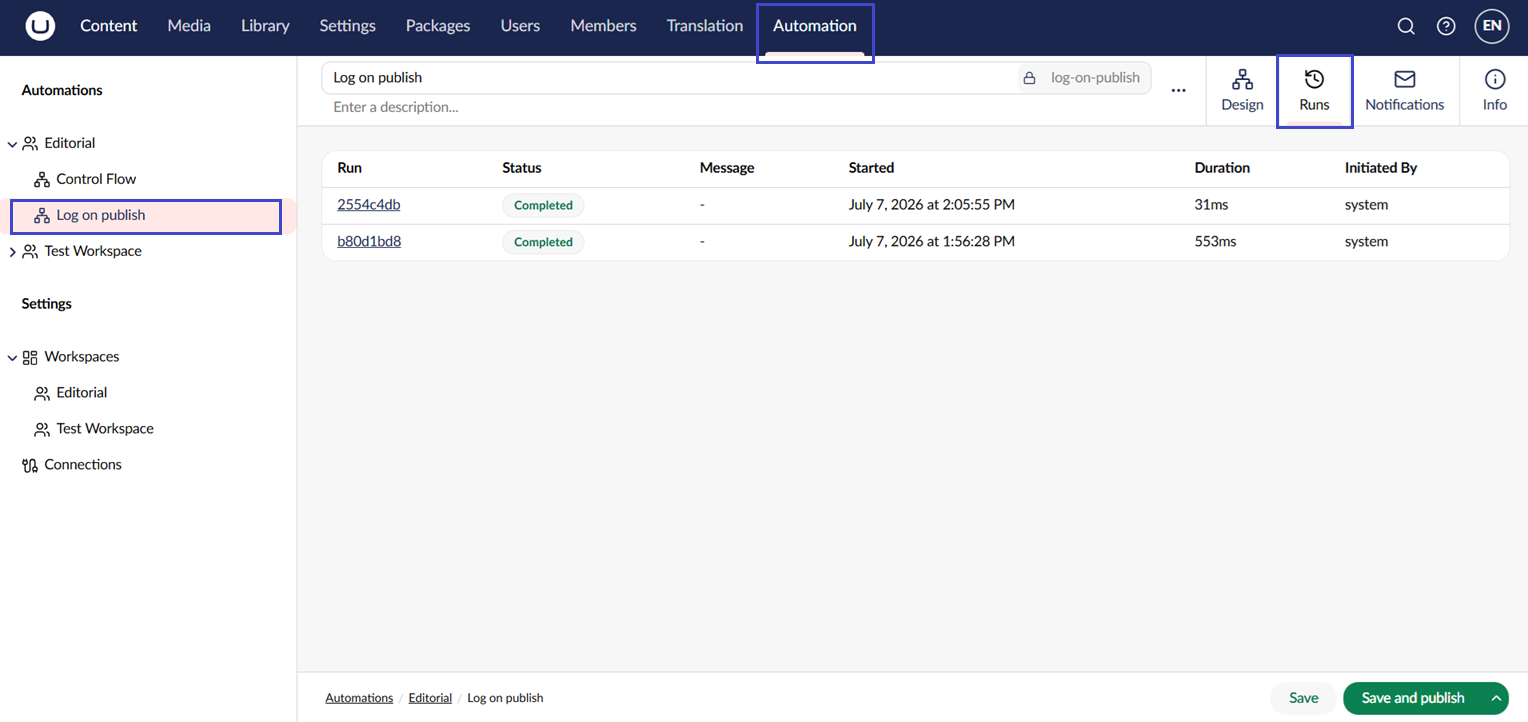
1. Open the automation in the tree.
2. Switch to the **Runs** tab.
3. Scroll or page through the list of runs, most recent first. The list refreshes automatically as new runs start and finish.
The runs list view.
## Inspect a Run
Click a run to open its details. The main area lists the trigger first, followed by each step that ran, in order. Each step row shows the action name, how long the step took, and its status.
The **Run Info** panel shows the run's status, start and completion times, and who or what initiated it. It also shows the automation version that ran and any error that ended the run. When a failing step ended the run, the error is that step's error.
Depending on the run's status, you can act on it from the buttons at the bottom:
* **Suspend** pauses a running run.
* **Resume** continues a suspended run. It isn't offered while a step waits for an approval. Approve or reject the approval instead.
* **Terminate** stops a running or suspended run, after you confirm.
* **Replay** starts a new run with the same trigger data, once a run has completed, failed, or been rejected. **Replay** is unavailable while the automation is unpublished.
## Read Step Data
Click the trigger row or a step row to expand it. Expanding the trigger row shows the data the trigger passed into the run.
When a step failed, its error appears above the tabs. An expanded step has these tabs:
| Tab | Contents |
| ----------- | -------------------------------------------------------------------------------------------------------- |
| **Details** | When the step started and completed, and how many times it was retried. |
| **Input** | The step's settings as they were used for this run, with bindings and configuration references resolved. |
| **Output** | The data the step produced, available to downstream bindings. |
| **Logs** | The log entries the action wrote while it ran. Only shown when the step wrote at least one entry. |
Input, output, and trigger data are shown as a list of properties, with nested objects and JSON text formatted for reading. Switch on **Raw JSON** to see the value exactly as it was stored. Values longer than 65,536 characters are truncated.
Sensitive settings, such as passwords and API keys, are always masked as `********`. Automate masks them before storing the step's input, so a resolved secret is never saved with the run.
### Log Entries
Each log entry shows the time it was written, its level (Debug, Info, Warning, or Error), and a message. The built-in actions write entries that describe what they did. For example:
* **HTTP Request** writes the method, URL, status code, response time, and response size. User names, passwords, and query strings are left out of the URL. A removed query string shows as `?…`.
* **Run Script** writes the script's `console` output. `console.warn` becomes a Warning and `console.error` an Error.
* **Create Content** writes the item it created, and warns about property aliases it could not set.
Request and response bodies, headers, email addresses, and property values are never logged. Any sensitive setting value that appears in a message is redacted.
Entries below `Execution:MinimumLogLevel` (Info by default) are not recorded. Each step keeps its first `Execution:MaxLogEntriesPerStep` entries (200 by default). Later entries are dropped without a warning. See [Configuration](/umbraco-automate/getting-started/configuration.md).
## Retention
Automate deletes runs older than `RunCleanup:RetentionDays` (90 by default). It also keeps at most `RunCleanup:MaxRunsPerAutomation` runs per automation (1,000 by default). See [Run Cleanup](/umbraco-automate/getting-started/configuration.md#run-cleanup).
## See Also
* [Runs](/umbraco-automate/concepts/runs.md)
* [Versioning](/umbraco-automate/concepts/versioning.md)
---
# Agent Instructions
This documentation is published with GitBook. GitBook is the documentation platform designed so that both humans and AI agents can read, navigate, and reason over technical content effectively. Learn more at gitbook.com.
## Querying This Documentation
If you need additional information that is not directly available in this page, you can query the documentation by asking a question.
Perform an HTTP GET request on the following URL with the `ask` and `goal` query parameters:
```
GET https://docs.umbraco.com/umbraco-automate/backoffice/runs.md?ask=&goal=
```
`ask` is the immediate question: it should be specific, self-contained, and written in natural language.
`goal` is what the user is ultimately trying to achieve, the reason they need the answer. Sharing it helps GitBook give you a better, more relevant answer. A goal is most helpful when it describes the outcome the user wants rather than restating the question. For example, with `ask=how do I create an API token`, a goal like `automate deployments from our CI pipeline` lets GitBook tailor the answer to that use case.
The response will contain a direct answer to the question and relevant excerpts and sources from the documentation.
Use this mechanism when the answer is not explicitly present in the current page, you need clarification or additional context, or you want to retrieve related documentation sections.