> For the complete documentation index, see [llms.txt](https://docs.umbraco.com/llms.txt). Markdown versions of documentation pages are available by appending `.md` to page URLs; this page is available as [Markdown](https://docs.umbraco.com/umbraco-cloud/build-and-customize-your-solution/handle-deployments-and-environments/manage-baseline-children.md).

# Manage Baseline Children

Use the **Manage child projects** page to push updates from your Baseline to connected child projects, and monitor each child's update status. You can also break the connection when needed.

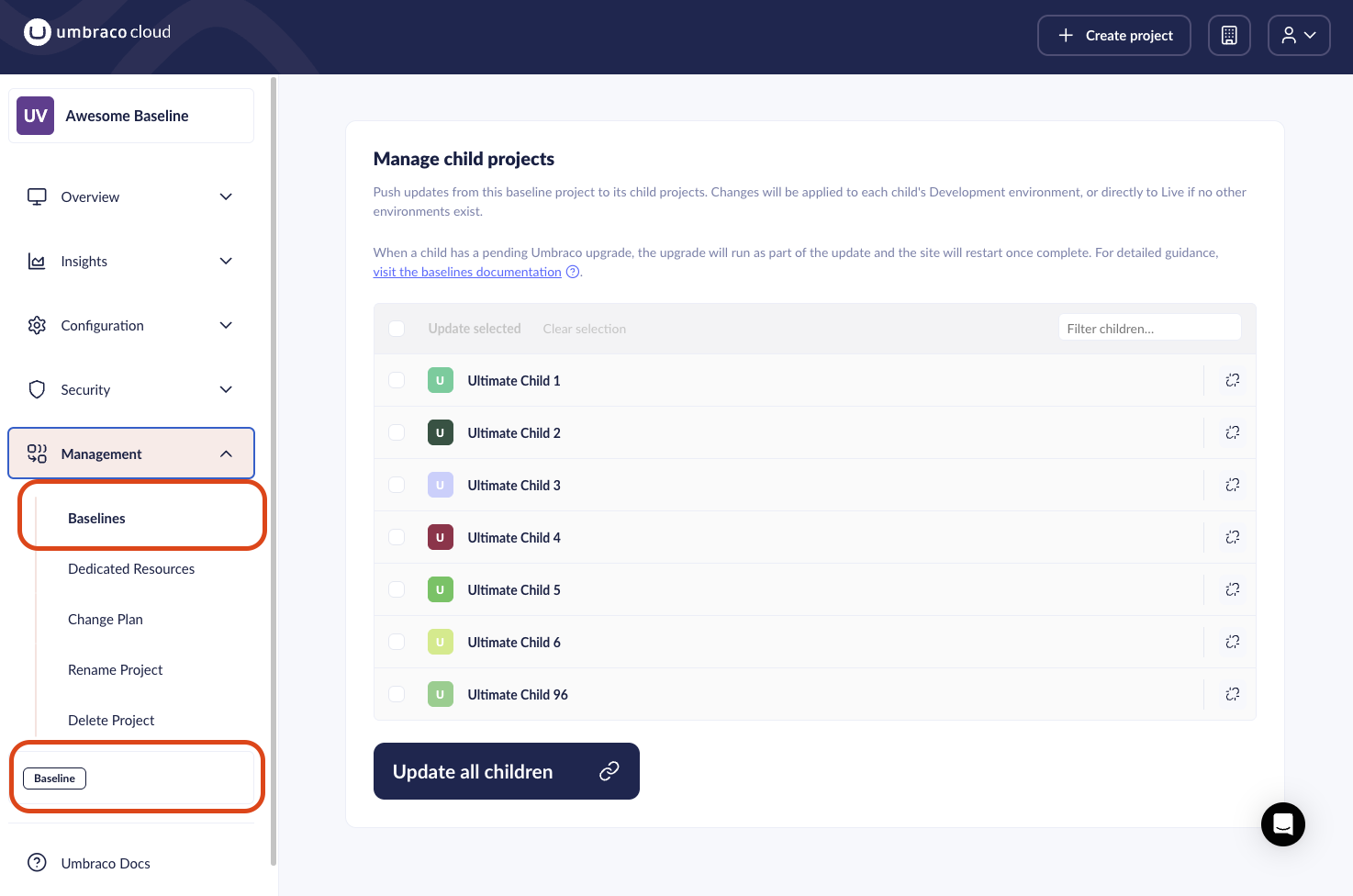
The page is available on any project used as a baseline. Access it in multiple ways:

1. Go to the Baseline project in the Umbraco Cloud portal.
2. Navigate to the **Manage child projects** page.
3. Click the **Baseline** label at the bottom of the left-side menu.
   * Alternatively, go to **Management** > **Baselines**.

<figure><img src="/files/ax0A4O0aGwXxIF9oq0V6" alt="The Baselines management page showing connected Child projects"><figcaption><p>Navigation showing how to navigate to the <strong>Manage child projects</strong> page.</p></figcaption></figure>

## Page overview

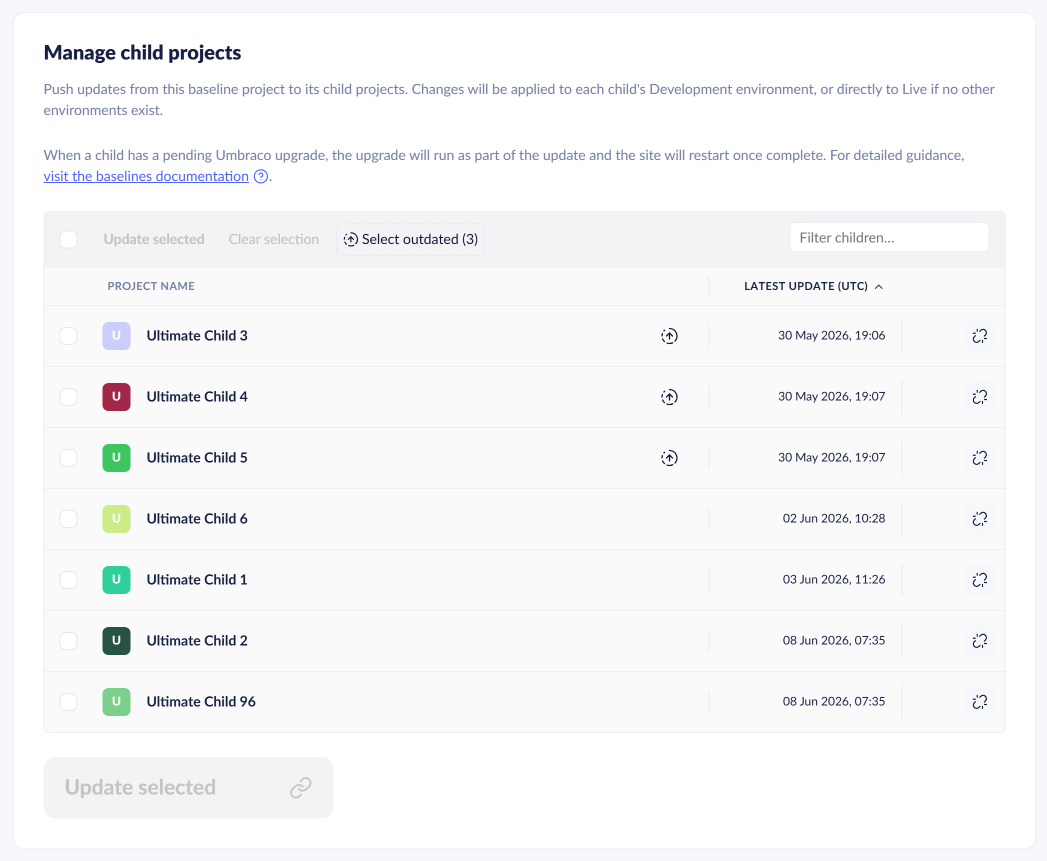
The page shows a list of projects that are based on the baseline.

<figure><img src="/files/lvhg1lvgobChvlfbEY2z" alt="Baselines - Manage child projects page"><figcaption><p>The Manage child projects page lists child projects connected to the baseline.</p></figcaption></figure>

Each child project shows the **Last update (UTC)**. A child project that has not been updated within the last 5 baseline updates shows a generic message.
<figure><img src="/files/64aR6dzpS1ivqnYbAY8C" alt="Baselines - Child was not updated in the last 5 updates"><figcaption><p>A child project that has not been updated within the last 5 baseline updates shows a generic message.</p></figcaption></figure>

### Pushing changes from baseline to children

You can push changes coming from the baseline out to the children.

Use the checkboxes to select which child projects you want to update. Click **Update selected** to push changes from the baseline to the child projects.

Pushing changes from the baseline creates an entry in **Project history**. Each targeted child project also gets its own entry.

### Actions, sorting, and filters

Click a column header to sort the list by `Project name` or `Last update (UTC)`.

The **Filter children** input field filters the list by project name.

Use the **Select outdated** button in the action bar to select all children where component versions are behind the baseline. Then click **Update selected** to push changes.

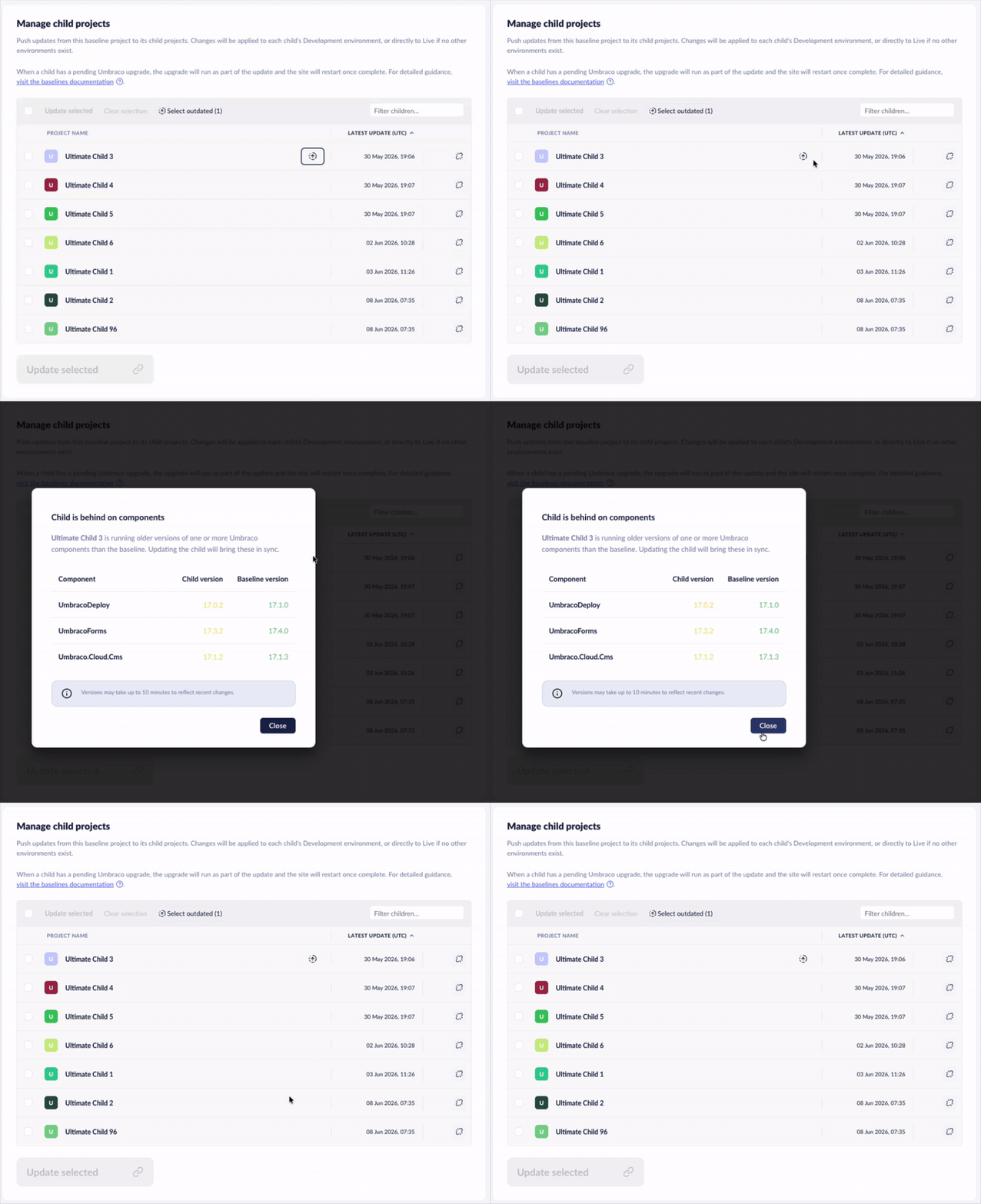
### Outdated components

A child project can show an indicator for components that are behind the baseline. Tracked components include Umbraco CMS, Deploy, Forms, Umbraco ID, `Umbraco.Cloud.Cms`, and more.

<figure><img src="/files/sN6TwqrHbrxefr5uMOGM" alt="Baselines - Show components on child project that are behind the baseline"><figcaption><p>Child projects showing components that are behind the baseline.</p></figcaption></figure>

## Break Reference between Baseline and Child Project

To remove the connection between a Baseline and a Child project, you need admin privileges. Once disconnected, the Child project becomes a standalone project and will no longer receive updates from the Baseline.

{% hint style="warning" %}
Breaking the connection cannot be undone.
{% endhint %}

1. Navigate to the **Manage child projects** page.
2. Click the disconnect icon next to the Child project you want to disconnect.

![Disconnect icon](/files/L15p0WGf3nTUGgvCC89z)

A confirmation window appears, showing the consequences of disconnecting.

3. Enter the Child project name you wish to disconnect.
4. Click **Disconnect**.

![Break Baseline and child project](/files/ViNnclBgJSWWUyBWF81N)

## Related articles

{% content-ref url="/pages/2V7exveJLy77dkbA1Kx4" %}
[Pushing Upgrades to a Child Project](/umbraco-cloud/optimize-and-maintain-your-site/monitor-and-troubleshoot/resolve-issues-quickly-and-efficiently/baseline-merge-conflicts/upgrading-child-projects.md)
{% endcontent-ref %}

{% content-ref url="/pages/ElbaEH8TFUPraQntnpcG" %}
[Handling configuration files](/umbraco-cloud/optimize-and-maintain-your-site/monitor-and-troubleshoot/resolve-issues-quickly-and-efficiently/baseline-merge-conflicts/configuration-files.md)
{% endcontent-ref %}

{% content-ref url="/pages/oB1uYBsVV6ZPxfGxTFgg" %}
[Baseline Merge Conflicts](/umbraco-cloud/optimize-and-maintain-your-site/monitor-and-troubleshoot/resolve-issues-quickly-and-efficiently/baseline-merge-conflicts.md)
{% endcontent-ref %}


---

# Agent Instructions
This documentation is published with GitBook. GitBook is the documentation platform designed so that both humans and AI agents can read, navigate, and reason over technical content effectively. Learn more at gitbook.com.

## Querying This Documentation
If you need additional information that is not directly available in this page, you can query the documentation dynamically by asking a question.

Perform an HTTP GET request on the current page URL with the `ask` query parameter, and the optional `goal` query parameter:

```
GET https://docs.umbraco.com/umbraco-cloud/build-and-customize-your-solution/handle-deployments-and-environments/manage-baseline-children.md?ask=<question>&goal=<endgoal>
```

`ask` is the immediate question: it should be specific, self-contained, and written in natural language.
`goal` is optional and describes the broader end goal you are ultimately trying to accomplish on behalf of the user. GitBook uses it to tailor the answer towards what is most useful for that goal.

The response will contain a direct answer to the question and relevant excerpts and sources from the documentation.

Use this mechanism when the answer is not explicitly present in the current page, you need clarification or additional context, or you want to retrieve related documentation sections.