> For the complete documentation index, see [llms.txt](https://docs.umbraco.com/llms.txt). Markdown versions of documentation pages are available by appending `.md` to page URLs; this page is available as [Markdown](https://docs.umbraco.com/umbraco-cloud/build-and-customize-your-solution/set-up-your-project/project-settings.md).
# Project Settings
When working with an Umbraco Cloud project, you can handle the project configuration directly in the Umbraco Cloud Portal. You can manage the following configurations from the left-side menu:

## Overview
### Environments
The Environments section provides an overview of your project’s environments. Here, you can:
* Access the Website (frontend) and backend,
* Open Kudu, and
* Clone down the environment locally.

### Team
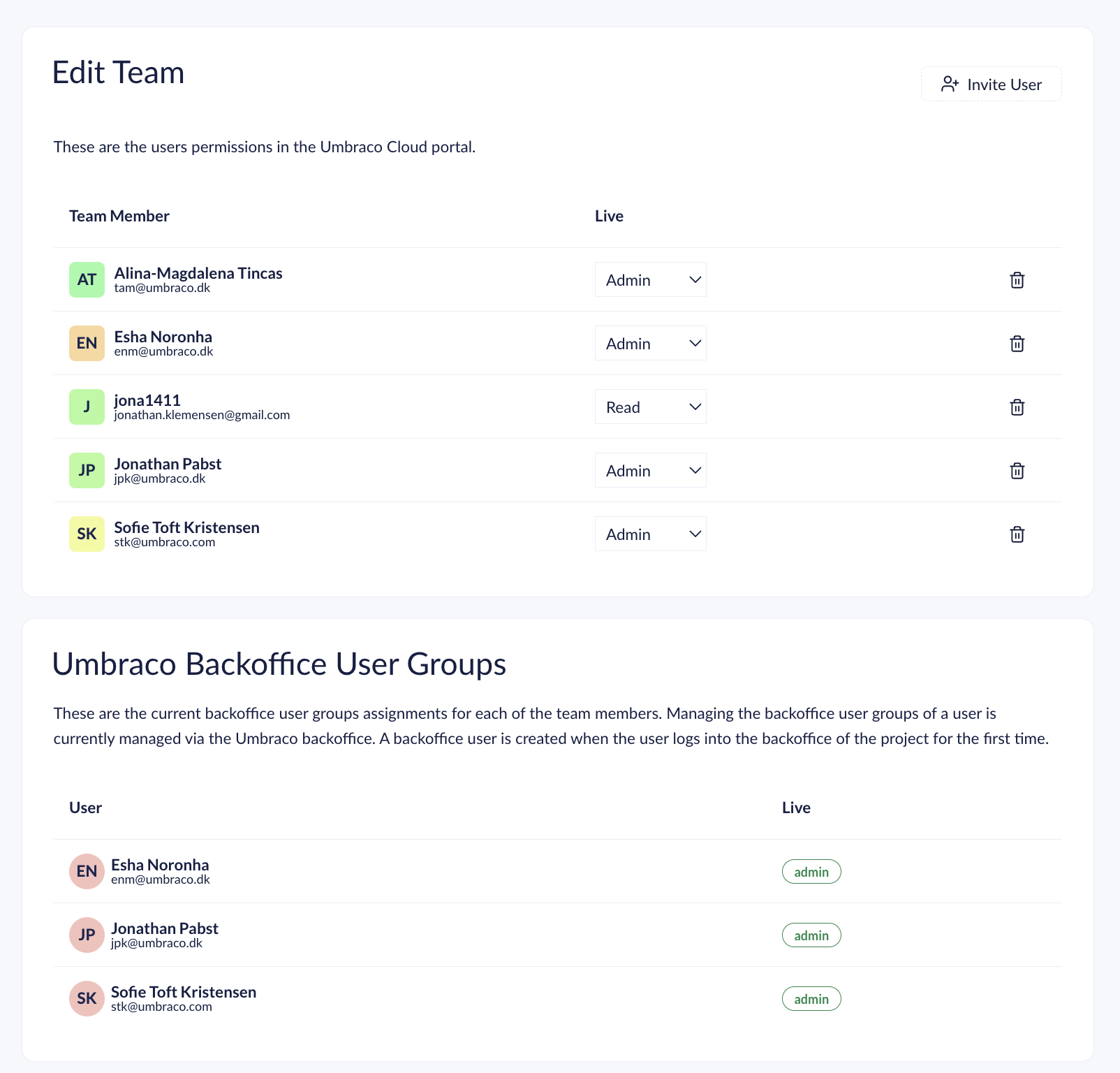
The Team section allows you to:
* Manage team members and their permissions on different environments.
* Add new team members.
* Manage backoffice user groups and [Technical contacts](/umbraco-cloud/begin-your-cloud-journey/project-features/team-members/technical-contact.md) for your project.
* Monitor pending project invitations.
### Summary
The **Summary** section displays key information such as the project plan, the region where the project was created, payment status, and more.

## Insights
### [Project History](/umbraco-cloud/optimize-and-maintain-your-site/monitor-and-troubleshoot/project-history.md)
In the Project History section, you can view a list of high-level activities for your cloud project.

### [Hostname Monitoring](/umbraco-cloud/optimize-and-maintain-your-site/monitor-and-troubleshoot/hostname-monitoring.md)
Hostname monitoring allows you to track the availability and response times of your websites. You can configure monitors for multiple hostnames, set check frequency and locations, and view historical ping results. This helps ensure optimal website performance and alerts you to potential downtime or performance issues.
### [Traffic & Performance](/umbraco-cloud/optimize-and-maintain-your-site/monitor-and-troubleshoot/traffic-and-performance.md)
You can see metrics related to the overall health and performance of the Azure app service hosting the different environments of your solution.

### [Usage](/umbraco-cloud/optimize-and-maintain-your-site/monitor-and-troubleshoot/usage.md)
The Usage section allows you to:
* View the usage of Custom Domains, Media Storage, Bandwidth, and Bandwidth History for your project.
* Check whether the project is using above or below the allowed amount for its plan.
* View the top 10 bandwidth usage paths, referrers, and the top 50 media files.

### Environment Logs
Each environment has an error log that appears only if there are any unread errors in that specific environment. You can view the errors by clicking on **Environment logs** in the **Insights** menu.
During development, too many errors can slow down the error page. To fix this, connect to the environment's database locally and delete the errors. Learn how to connect to the database in the [Database on Umbraco Cloud](/umbraco-cloud/build-and-customize-your-solution/set-up-your-project/databases/cloud-database.md) section.
Environment errors are stored in the `UCErrorLog` table.
The query below deletes 90% of the errors. The query always deletes the oldest errors first. You can tweak the query to delete any percentage of errors by changing the number in the first row.
```sql
DELETE TOP(90) PERCENT
FROM [dbo].[UCErrorLog]
WHERE [Read] = 0
```
## Configuration
### [Connections](/umbraco-cloud/build-and-customize-your-solution/set-up-your-project/databases.md)
The Connections section provides connection details for your Umbraco Cloud databases. You need to allow your IP to connect to the databases with your local machine.

### [Automatic Upgrades](/umbraco-cloud/optimize-and-maintain-your-site/manage-product-upgrades/product-upgrades/minor-upgrades.md)
The Automatic Upgrades section handles minor and patch upgrades for the Umbraco components used by Umbraco Cloud. By default, new projects have automatic upgrades enabled.
You can manage whether your site is automatically upgraded with the latest patch and minor version(s) of Umbraco CMS, Forms, and Deploy.
For information about opting out of automated upgrades, see the [Product Upgrades](/umbraco-cloud/optimize-and-maintain-your-site/manage-product-upgrades/product-upgrades.md) article.

### [Content Delivery Network (CDN) and Caching](/umbraco-cloud/optimize-and-maintain-your-site/optimize-performance/manage-cdn-caching.md)
The CDN and Caching section lets you manage CDN Caching and Optimization settings for your project. You can:
* Modify the default settings that apply to all hostnames added to the project.
* Set specific caching settings per hostname if different configurations are required for certain hostnames.
* Purge Cache for individual hostnames or all of them.
These settings apply to custom hostnames only. The default `*.{region}.umbraco.io` hostnames of the project cannot be cached in the CDN. For more information, see [CDN Caching and Optimizations](/umbraco-cloud/optimize-and-maintain-your-site/optimize-performance/manage-cdn-caching.md#custom-hostname-requirement).

### [Hostnames](/umbraco-cloud/go-live/manage-hostnames.md)
In the Hostnames section, you can bind hostnames to your Umbraco Cloud project.

### [Webhooks](/umbraco-cloud/build-and-customize-your-solution/handle-deployments-and-environments/deployment/deployment-webhook.md)
You can configure deployment webhooks for your environments in this section. Webhooks are triggered upon successful deployments, and you can specify where the deployment information is sent.

### [CI/CD Flow](/umbraco-cloud/build-and-customize-your-solution/handle-deployments-and-environments/umbraco-cicd.md)
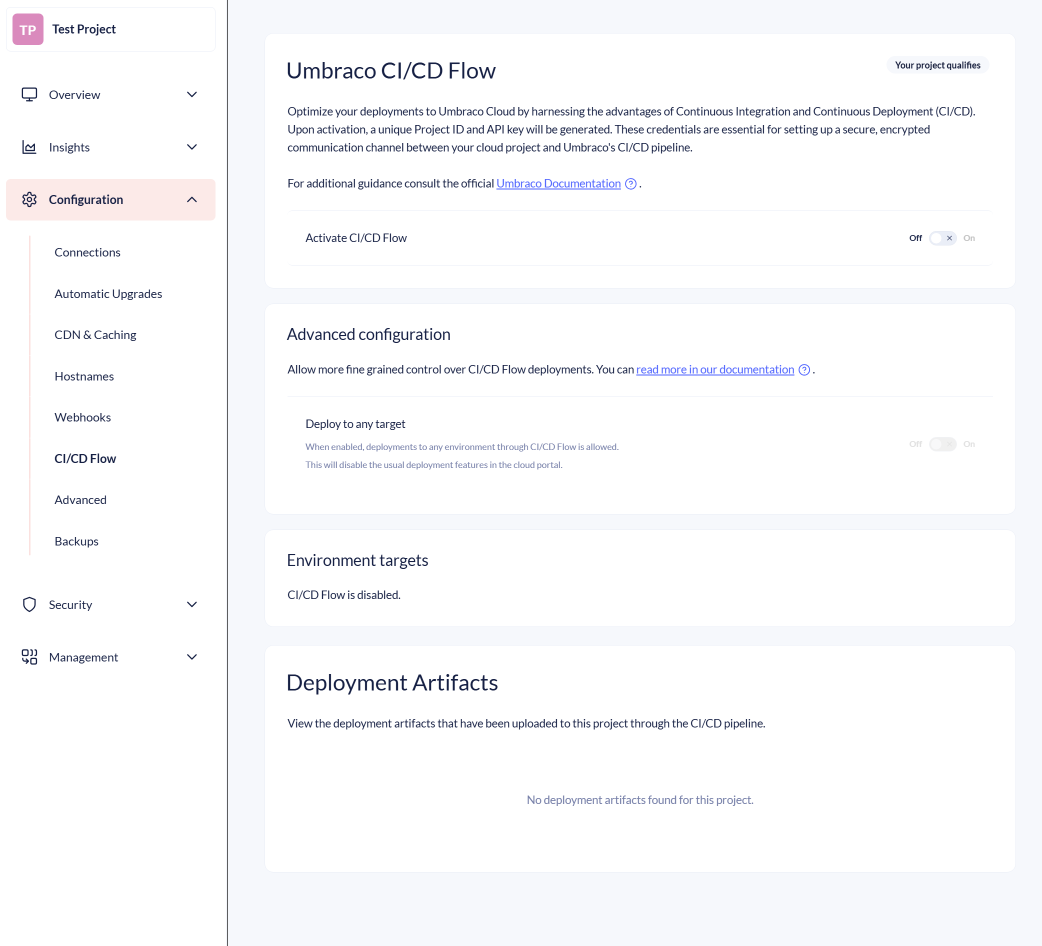
The CI/CD Flow section allows you to manage settings related to CI/CD deployments:
* Enable CI/CD Flow with or without Advanced options.
* See a list of environments that can be targeted by CI/CD Flow.
* See a paginated list of artifacts that have been pushed to your project via the CI/CD pipeline.
### Advanced
The Advanced section provides options for managing advanced settings for your project, including:
* [Enable static outbound IP addresses](/umbraco-cloud/expand-your-projects-capabilities/external-services.md#enabling-static-outbound-ip-addresses) for projects on **Standard**, **Professional**, or **Enterprise** plans.
* Enable IIS logging for each environment. The log files can be accessed in Kudu at `C:\home\LogFiles\http`. IIS logs have a rolling size limit of 100 MB, overwriting the oldest files once the limit is reached.
* [Enable loading of a client certificate from the file system](/umbraco-cloud/build-and-customize-your-solution/set-up-your-project/project-settings/application-settings.md#enable-client-certificate-loaded-from-file-system-explained).
* Change the .NET framework runtime for each environment of your Umbraco Cloud project.
* Change the value of the `DOTNET_ENVIRONMENT` environment variable for each environment of your Umbraco Cloud project. To learn more about working with multiple environments in ASP.NET Core, refer to the [Microsoft Documentation](https://learn.microsoft.com/en-us/aspnet/core/fundamentals/environments?view=aspnetcore-9.0).
* [Manage Platform Configuration](/umbraco-cloud/build-and-customize-your-solution/set-up-your-project/project-settings/platform-configuration.md) to control Proactive Auto-Heal and Always On for your environments. Managing these settings is available only for environments on a **Dedicated** plan.
{% hint style="info" %}
Enabling IIS logging will cause the site to restart. For additional information, refer to the [Microsoft Documentation](https://docs.microsoft.com/en-us/iis/configuration/system.webserver/httplogging).
{% endhint %}
{% hint style="info" %}
Changing the .NET framework runtime or the `DOTNET_ENVIRONMENT` environment variable will also cause your website to restart.
{% endhint %}
{% hint style="info" %}
When using `WebApplication`, `DOTNET_ENVIRONMENT` takes precedence over `ASPNETCORE_ENVIRONMENT`. When using the legacy `WebHost`, `ASPNETCORE_ENVIRONMENT` takes precedence instead.
You can also override the environment value by setting the `ASPNETCORE_ENVIRONMENT` variable in your `web.config` file.
{% endhint %}


### [Backups](/umbraco-cloud/build-and-customize-your-solution/set-up-your-project/databases/backups.md#backup-on-umbraco-cloud)
The Backups section enables you to create database backups for one or more of your cloud environments.

## Security
### [Public Access](/umbraco-cloud/build-and-customize-your-solution/set-up-your-project/project-settings/public-access.md)
{% hint style="info" %}
By default, Public access is available for projects created after the 10th of January 2023.
The [Umbraco.Cloud.Cms.PublicAccess](https://www.nuget.org/packages/Umbraco.Cloud.Cms.PublicAccess) package can be installed to enable Public access for projects created before the 10th of January 2023.
{% endhint %}
The Public access setting, found under the Security tab, allows you to deny access to your project. Users who are not part of the project or whose IP addresses have not been allowed will not be able to access the project.
You can enable or disable this setting on the Public access page. Access to manage Public access requires your project to be on the Standard plan or higher.

### [External Login Providers](/umbraco-cloud/begin-your-cloud-journey/project-features/external-login-providers.md)
External Login Providers allow you to integrate third-party authentication systems to manage backoffice user logins securely. Using OpenID Connect, you can connect providers like Microsoft Entra ID, Auth0, and Google to simplify login management and improve security for your teams.
### [Transport Security](/umbraco-cloud/build-and-customize-your-solution/set-up-your-project/security/managing-transport-security.md)
The Transport Security section enables you to manage transport security settings for your project. You can configure specific transport security options for all hostnames or individual hostnames within your project.

### [Management API Security](/umbraco-cloud/optimize-and-maintain-your-site/monitor-and-troubleshoot/management-api-security.md)
The Management API Security section allows you to secure access to the backend services of your project. This can be managed from the Security menu on the Umbraco Cloud Portal.

### [Secrets](/umbraco-cloud/begin-your-cloud-journey/project-features/secrets-management.md)
The Secrets Management section is used for storing sensitive information such as API keys, encryption keys, and connection strings used by your Umbraco Cloud project.

## Management
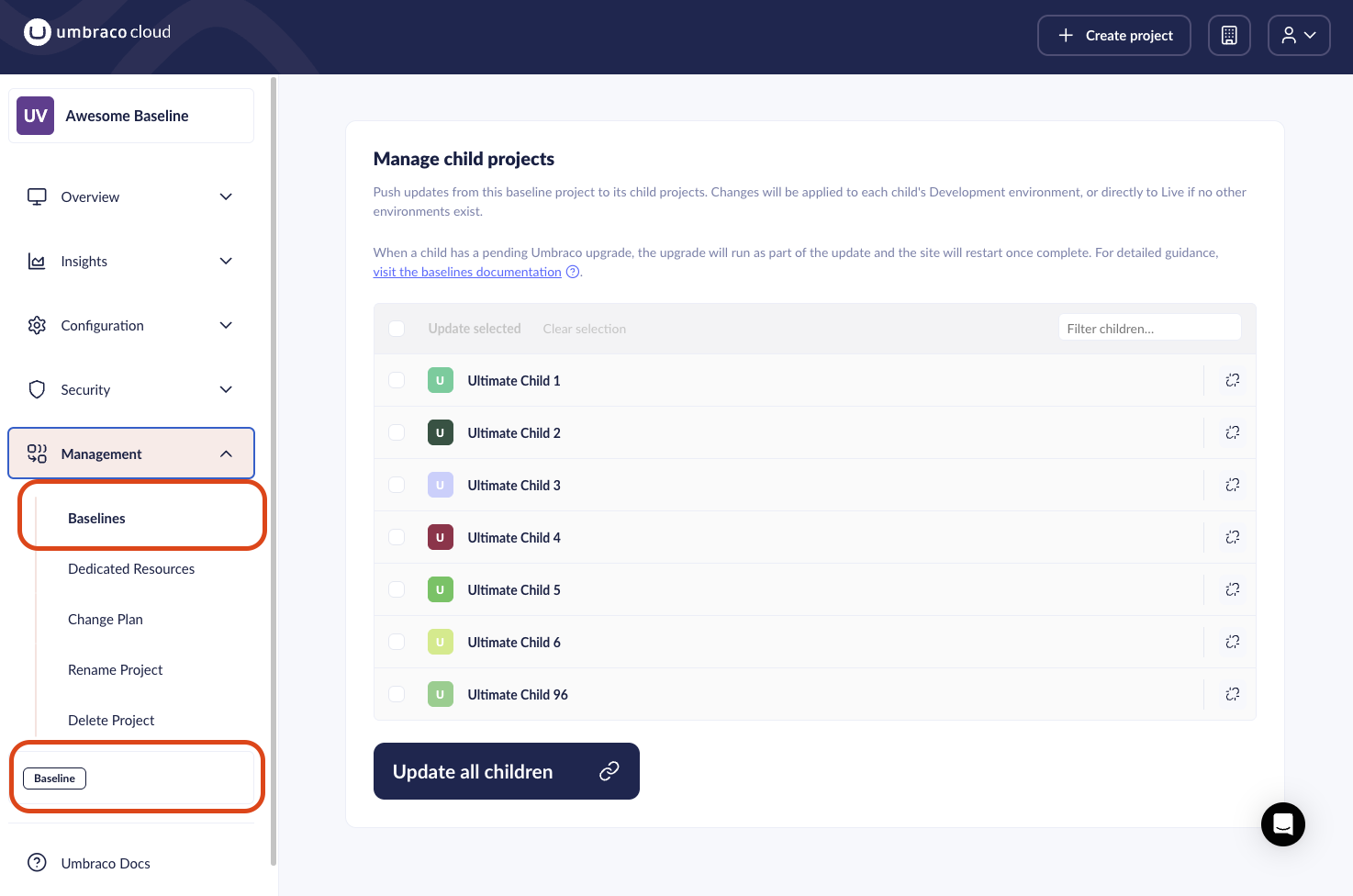
### [Baselines](/umbraco-cloud/begin-your-cloud-journey/creating-a-cloud-project/baselines.md)
A Baseline is a project that serves as a template for creating child projects. When you set up a baseline project, you can quickly spin up new projects with the same packages, components, and configuration. Any changes you make to the baseline can be pushed to all connected child projects, keeping them in sync.
### [Dedicated Resources](/umbraco-cloud/build-and-customize-your-solution/set-up-your-project/project-settings/dedicated-resources.md)
You can change your Umbraco Cloud project to run in a dedicated setup with additional computational resources compared to the shared setup. You can choose between different dedicated options depending on the number of resources you will need for your project.

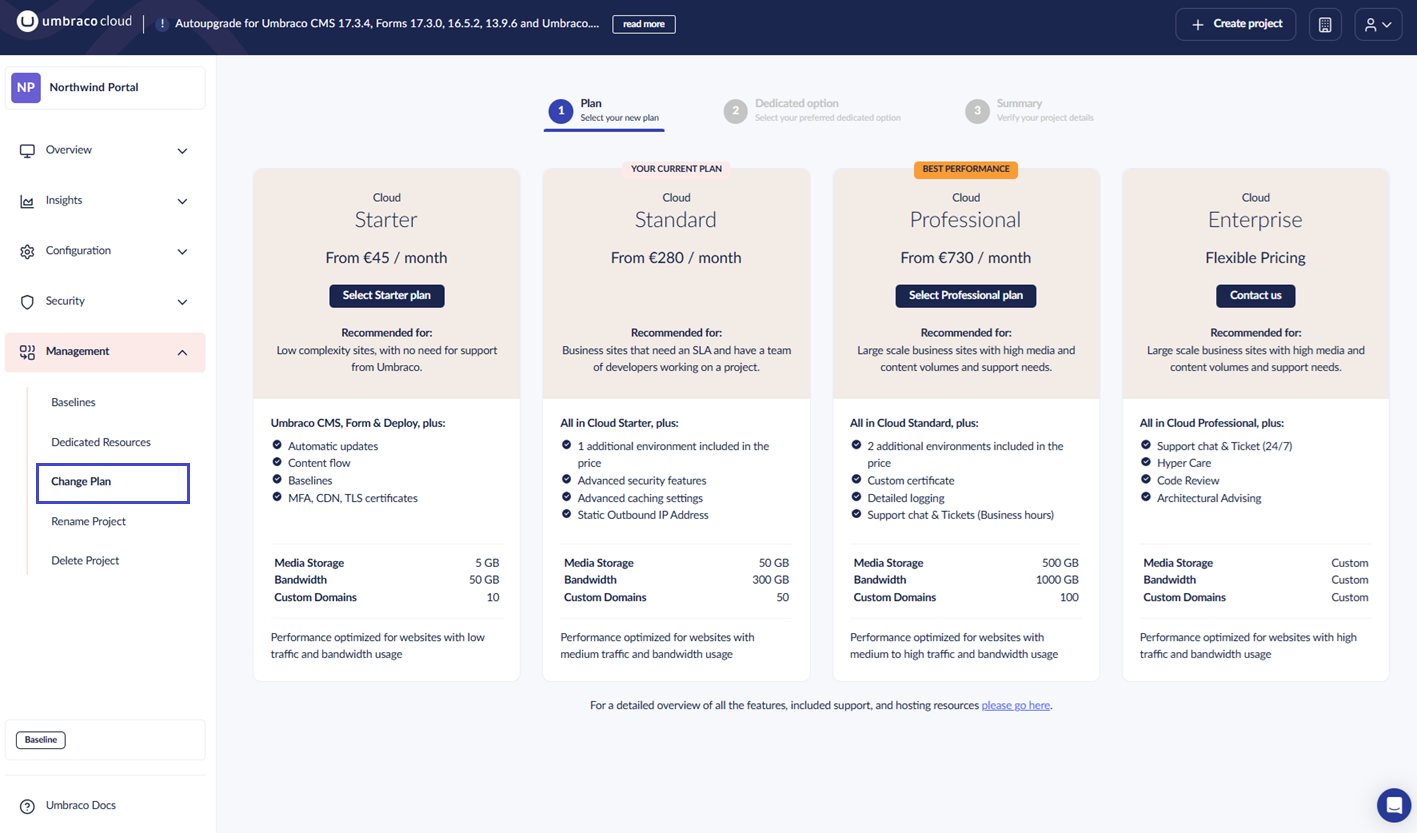
### Change Plan
You can change your Umbraco Cloud plan to upgrade to a higher plan or downgrade to a lower plan depending on your project needs. You can manage plan changes and dedicated resources from the **Management** menu.
### Rename Project
You can rename your Umbraco Cloud project from the **Management** menu.
{% hint style="info" %}
If you are working locally, you need to update the origin of your local git repository to point to the new clone URL. Alternatively, you can make a fresh local clone of the project once you’ve changed your project name.
{% endhint %}

#### [Renaming the Project file and folder](/umbraco-cloud/build-and-customize-your-solution/handle-deployments-and-environments/working-locally.md#renaming-the-project-files-and-folders)
You can rename your project from the **Rename Project** section in the **Management** menu on the Umbraco Cloud Portal. When you rename a project, the default hostnames and clone URLs assigned to the project are updated to match the new project name. You can also rename your project files and folders locally.
### Delete Project
You can delete your Umbraco Cloud project from the **Management** menu. Deleting your Umbraco Cloud project is permanent - all data, media, databases, configuration, setup, and domain bindings are removed in the process.
{% hint style="info" %}
Deleting your Umbraco Cloud project will also cancel any subscriptions you have set up for the project.
{% endhint %}

---
# Agent Instructions
This documentation is published with GitBook. GitBook is the documentation platform designed so that both humans and AI agents can read, navigate, and reason over technical content effectively. Learn more at gitbook.com.
## Querying This Documentation
If you need additional information that is not directly available in this page, you can query the documentation by asking a question.
Perform an HTTP GET request on the following URL with the `ask` and `goal` query parameters:
```
GET https://docs.umbraco.com/umbraco-cloud/build-and-customize-your-solution/set-up-your-project/project-settings.md?ask=&goal=
```
`ask` is the immediate question: it should be specific, self-contained, and written in natural language.
`goal` is what the user is ultimately trying to achieve, the reason they need the answer. Sharing it helps GitBook give you a better, more relevant answer. A goal is most helpful when it describes the outcome the user wants rather than restating the question. For example, with `ask=how do I create an API token`, a goal like `automate deployments from our CI pipeline` lets GitBook tailor the answer to that use case.
The response will contain a direct answer to the question and relevant excerpts and sources from the documentation.
Use this mechanism when the answer is not explicitly present in the current page, you need clarification or additional context, or you want to retrieve related documentation sections.