> For the complete documentation index, see [llms.txt](https://docs.umbraco.com/llms.txt). Markdown versions of documentation pages are available by appending `.md` to page URLs; this page is available as [Markdown](https://docs.umbraco.com/umbraco-cloud/optimize-and-maintain-your-site/monitor-and-troubleshoot/sustainability-dashboard.md).
# Sustainability Dashboard
Monitor your projects' CO2 emissions on Umbraco Cloud and learn how the emissions are calculated.
The Sustainability Dashboard helps you monitor and reduce the environmental impact of your websites on Umbraco Cloud. You can use it to track CO2 emissions for your projects and align your digital presence with your sustainability goals.
## Key Features
* **Monthly CO2 emission data**: The dashboard reports CO2 emissions per month. A month's data becomes available a few weeks after the month ends.
* **Historical trends**: The dashboard tracks emissions over time, so you can review monthly and yearly trends.
* **Per-component breakdown**: You can see which Azure resources and how much network usage contribute to your emissions.
* **Comparative analysis**: You can compare emissions across your projects to find high-impact areas.
* **Date range selection**: You can choose the period to report on. The dashboard defaults to the current year to date.
* **CSV export**: You can download the emission report as a CSV file.
## CO2 emission calculation methodology
The dashboard reports two kinds of emissions. Most come from the Azure resources that host your websites, based on Microsoft's reported data from Azure Carbon Optimization. The dashboard also estimates the emissions from network egress, which is the data your sites transfer to visitors.
The emissions are reported as carbon dioxide equivalent (CO2e). The data covers Scope 1, Scope 2, and Scope 3 emissions.
### Covered Azure resources
For Azure resources, Microsoft reports the emissions and Umbraco Cloud attributes them to your projects and environments. The dashboard includes the following Azure resource types:
* App Service
* SQL Database
* SQL Elastic Pool
* Storage Account
* Key Vault
### Network egress (Bandwidth)
The dashboard reports the emissions from network egress as a **Bandwidth** component. This is the energy used to deliver your sites' data across the network to visitors. Microsoft does not report these emissions, so Umbraco Cloud estimates them from the volume of data your sites transfer.
The estimate uses the network energy intensity from the [Sustainable Web Design Model](https://sustainablewebdesign.org/estimating-digital-emissions/): **0.059 kWh per GB** transferred. This is multiplied by a global average grid carbon intensity of **494 g CO2e per kWh**, sourced from [Ember's global electricity data](https://ember-energy.org/data/). The result is about **29 g CO2e per GB** transferred:
`0.059 kWh/GB × 494 g CO2e/kWh ≈ 29 g CO2e/GB`
Data served from the edge cache travels a shorter network path. Cached traffic is therefore counted at 30% of this rate. The dashboard sums the result across all of a project's traffic for the month.
The Sustainable Web Design Model also covers data center and end-user device energy. The dashboard uses only the network segment. Data center energy is already counted in the Azure resources above, and end-user device energy is outside Umbraco Cloud's control.
### Shared resource attribution
Some Azure resources are shared between websites. Umbraco Cloud divides the emissions of a shared resource across the websites that use it:
* Emissions from a SQL Elastic Pool are divided across the databases in the pool.
* Emissions from a shared App Service Plan are divided across the websites on the plan.
* Emissions from storage are divided across the websites in the subscription.
These attributed values are approximations. Azure reports the emissions at the shared-resource level, not per website.
### What is not included
The dashboard reports emissions from the infrastructure and network that serve your websites. It does not include:
* End-user device energy, such as visitors' phones, tablets, and computers
* Emissions from the Umbraco Cloud platform itself
{% hint style="info" %}
Data from before Azure Carbon Optimization was available is derived from the previous calculation method. Trends across that change might not be directly comparable.
{% endhint %}
## Getting Started
### Accessing the Dashboard
1. Log in to [Umbraco Cloud](https://s1.umbraco.io/): Use your credentials to log in to your Umbraco Cloud account.
2. Navigate to the [Organization view](https://s1.umbraco.io/organization).
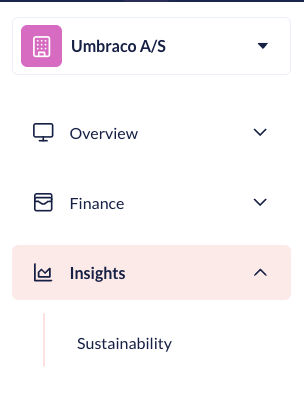
3. Navigate to the Dashboard: From the left menu, open the **Insights** category and select **Sustainability**.
### Using the Dashboard
From the dashboard you can:
* Select a date range to report on. The dashboard defaults to the current year to date.
* Sort the project table by emissions to find your highest-impact projects.
* Expand a project to see its per-component breakdown.
* Download the report as a CSV file.
### Decreasing Carbon Emission Impact
* Monitor Regularly: Regularly check the Sustainability Dashboard to stay informed about your website's carbon footprint.
* Implement Recommendations: Follow up to date [sustainability best practices](https://docs.umbraco.com/sustainability-best-practices).
* Optimize Resource Usage: Analyze your website's resource usage and optimize high-consumption areas.
---
# Agent Instructions
This documentation is published with GitBook. GitBook is the documentation platform designed so that both humans and AI agents can read, navigate, and reason over technical content effectively. Learn more at gitbook.com.
## Querying This Documentation
If you need additional information that is not directly available in this page, you can query the documentation by asking a question.
Perform an HTTP GET request on the following URL with the `ask` and `goal` query parameters:
```
GET https://docs.umbraco.com/umbraco-cloud/optimize-and-maintain-your-site/monitor-and-troubleshoot/sustainability-dashboard.md?ask=&goal=
```
`ask` is the immediate question: it should be specific, self-contained, and written in natural language.
`goal` is what the user is ultimately trying to achieve, the reason they need the answer. Sharing it helps GitBook give you a better, more relevant answer. A goal is most helpful when it describes the outcome the user wants rather than restating the question. For example, with `ask=how do I create an API token`, a goal like `automate deployments from our CI pipeline` lets GitBook tailor the answer to that use case.
The response will contain a direct answer to the question and relevant excerpts and sources from the documentation.
Use this mechanism when the answer is not explicitly present in the current page, you need clarification or additional context, or you want to retrieve related documentation sections.