> For the complete documentation index, see [llms.txt](https://docs.umbraco.com/llms.txt). Markdown versions of documentation pages are available by appending `.md` to page URLs; this page is available as [Markdown](https://docs.umbraco.com/umbraco-cloud/release-notes/overview-2026/2026-02-releasenotes.md).
# February 2026
## Key Takeaways
* **Release Umbraco.Cloud.Cms 13.0.1, 16.0.2 & 17.0.2** - Adds middleware that ensures the internal Azure URL remains hidden on initial requests.
* **Configure automatic patch upgrades** - Allows project admins to enable or disable automatic patch upgrades so you can now fully control when your project upgrades.
* **Disable parallel builds** - Disable parallel builds for Umbraco 9+ sites to prevent resource contention.
* **Project invite notifications** - Adds UI notifications when receiving project invitations, improving visibility and making it easier to respond directly from the Portal.
## Release Umbraco.Cloud.Cms 13.0.1, 16.0.2 & 17.0.2
This release resolved an issue where Cloud sites end up using `localhost` or `*.azurewebsites.net` as their root domain. The issue was caused by early Azure platform requests during site startup being persisted as the site's base URL.
We fixed this by using early middleware and forwarded headers to ensure the [`umbracoApplicationUrl`](https://github.com/umbraco/UmbracoDocs/tree/main/17/umbraco-cms/reference/configuration/webroutingsettings.md) overrides Azure hostnames before they are persisted.
## Configure automatic patch upgrades
It is now possible to [disable automatic patch upgrades](/umbraco-cloud/build-and-customize-your-solution/set-up-your-project/project-settings.md#automatic-upgrades) from the Project Settings page. New projects default to having automatic upgrades enabled.
{% hint style="warning" %}
If you have previously disabled automatic upgrades through Umbraco Support this will still be in effect. You can enable upgrades again using the toggles.
{% endhint %}

For more on configuring automatic upgrades refer to the [Projects Settings documentation](/umbraco-cloud/build-and-customize-your-solution/set-up-your-project/project-settings.md#automatic-upgrades).
## Disable parallel builds
{% hint style="info" %}
The following applies to sites using Umbraco 9 and newer.
{% endhint %}
When deploying to Umbraco Cloud, the build step of a deployment could previously utilize all available resources on the underlying infrastructure. This had the side effect that the deployments could end up experiencing resource contention, causing it to complete slowly or fail entirely.
We have now disabled parallel builds, ensuring that a single deployment can no longer consume all available resources. This reduces issues caused by the "noisy neighbor" effect and improves overall deployment reliability.
## Project invite notifications
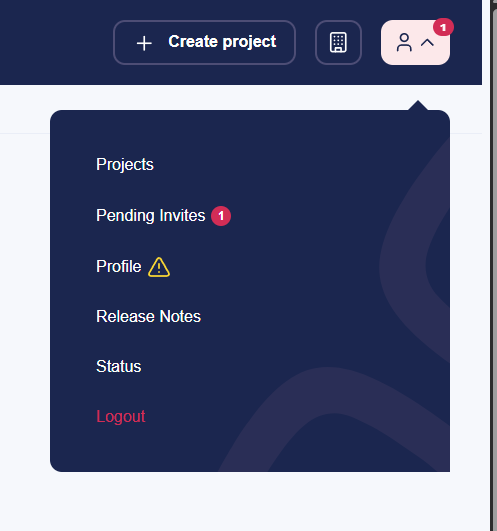
This update introduces in-app notifications in the Cloud Portal when you receive a project invitation.
A notification badge is now displayed in the UI, incrementing based on the number of pending invitations. For example, if you have five outstanding invites, the notification indicator will display 5, giving you a clear and immediate overview of outstanding actions.
This makes project onboarding more visible and ensures that invitations are not missed, especially for users who are invited to multiple projects.
Pending Invite Notification
---
# Agent Instructions
This documentation is published with GitBook. GitBook is the documentation platform designed so that both humans and AI agents can read, navigate, and reason over technical content effectively. Learn more at gitbook.com.
## Querying This Documentation
If you need additional information that is not directly available in this page, you can query the documentation dynamically by asking a question.
Perform an HTTP GET request on the current page URL with the `ask` query parameter, and the optional `goal` query parameter:
```
GET https://docs.umbraco.com/umbraco-cloud/release-notes/overview-2026/2026-02-releasenotes.md?ask=&goal=
```
`ask` is the immediate question: it should be specific, self-contained, and written in natural language.
`goal` is optional and describes the broader end goal you are ultimately trying to accomplish on behalf of the user. GitBook uses it to tailor the answer towards what is most useful for that goal.
The response will contain a direct answer to the question and relevant excerpts and sources from the documentation.
Use this mechanism when the answer is not explicitly present in the current page, you need clarification or additional context, or you want to retrieve related documentation sections.