> For the complete documentation index, see [llms.txt](https://docs.umbraco.com/llms.txt). Markdown versions of documentation pages are available by appending `.md` to page URLs; this page is available as [Markdown](https://docs.umbraco.com/umbraco-cloud/release-notes/overview-2026/2026-09-releasenotes.md). Agents can also search and read this documentation through its [MCP server](https://docs.umbraco.com/~gitbook/mcp).
# September 2026
## Key Takeaways
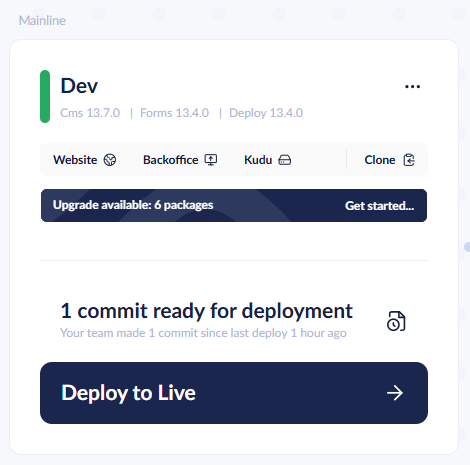
* **Upgrade available banner enhancements** - The **Upgrade available** banner now offers patch upgrades as well as minors, upgrades every eligible package in one go, and works on single-environment projects. Pending changes between environments no longer block an upgrade.
* **Release Umbraco.Cloud.Cms 17.2.3 & 18.0.3 and Umbraco.Cloud.Identity.Cms 13.2.9** - Remove obsolete endpoints related to Umbraco Id.
## Upgrade available banner enhancements
The **Upgrade available** banner on the left-most environment card in the Cloud Portal has been extended. Project administrators use the banner to upgrade a project on demand, independent of the automatic upgrade settings.
The Upgrade available banner on an environment card
The following has changed:
* **Patch upgrades are offered.** The banner previously offered minor upgrades only. Any higher minor or patch version within the same major is now offered.
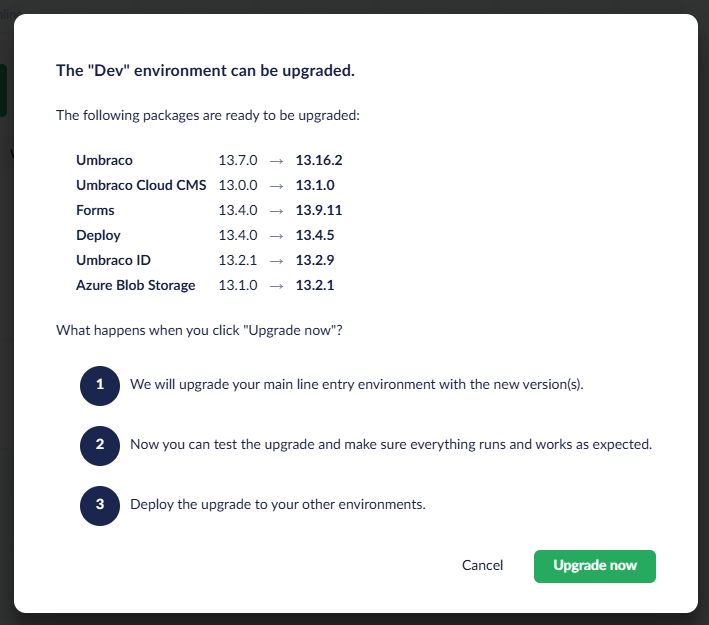
* **All eligible packages are upgraded in one go.** Previously, one product was upgraded per click. Umbraco CMS, Forms, Deploy, Deploy Contrib, Umbraco Cloud CMS, Umbraco ID, and the Azure Blob Storage provider are now upgraded together. The confirmation dialog lists every package with its current and target version.
* **Single-environment projects can upgrade.** Projects with only a Live environment were previously asked to add an environment first. Live is now upgraded directly. The confirmation dialog warns that the site restarts during the upgrade and links to the version-specific upgrade notes.
* **Pending changes no longer block the upgrade.** The upgrade commit is added on top of the pending changes on the environment and is included in the next deployment.
The confirmation dialog listing the packages to upgrade
Major version upgrades are still not offered by the banner. On projects with more than one environment, the banner still upgrades the left-most mainline environment only. You test the upgrade there and deploy onward yourself.
See the [Upgrade from the Cloud Portal](https://docs.umbraco.com/umbraco-cloud/optimize-and-maintain-your-site/manage-product-upgrades/product-upgrades/minor-upgrades.md#upgrade-from-the-cloud-portal) section for details on which versions are offered.
## Release Umbraco.Cloud.Cms 17.2.3 & 18.0.3 and Umbraco.Cloud.Identity.Cms 13.2.9
New versions of the `Umbraco.Cloud.Cms` package are available: 17.2.3 and 18.0.3.
A new version of the `Umbraco.Cloud.Identity.Cms` package is available: 13.2.9.
All three versions contain the same change.
### Remove obsolete endpoints related to Umbraco ID
Obsolete endpoints have been removed from the package.
---
# Agent Instructions
This documentation is published with GitBook. GitBook is the documentation platform designed so that both humans and AI agents can read, navigate, and reason over technical content effectively. Learn more at gitbook.com.
## Querying This Documentation
If you need additional information that is not directly available in this page, you can query the documentation by asking a question.
Perform an HTTP GET request on the following URL with the `ask` and `goal` query parameters:
```
GET https://docs.umbraco.com/umbraco-cloud/release-notes/overview-2026/2026-09-releasenotes.md?ask=&goal=
```
`ask` is the immediate question: it should be specific, self-contained, and written in natural language.
`goal` is what the user is ultimately trying to achieve, the reason they need the answer. Sharing it helps GitBook give you a better, more relevant answer. A goal is most helpful when it describes the outcome the user wants rather than restating the question. For example, with `ask=how do I create an API token`, a goal like `automate deployments from our CI pipeline` lets GitBook tailor the answer to that use case.
The response will contain a direct answer to the question and relevant excerpts and sources from the documentation.
Use this mechanism when the answer is not explicitly present in the current page, you need clarification or additional context, or you want to retrieve related documentation sections.