> For the complete documentation index, see [llms.txt](https://docs.umbraco.com/llms.txt). Markdown versions of documentation pages are available by appending `.md` to page URLs; this page is available as [Markdown](https://docs.umbraco.com/umbraco-cms/extend-your-project/backoffice-extensions/extending-overview/extension-types/sections/section-sidebar.md).
# Section Sidebar
Use Section Sidebar extensions to add navigation, coordinate Section Views, and provide additional functionality inside Section extensions.
[Section extensions](/umbraco-cms/extend-your-project/backoffice-extensions/extending-overview/extension-types/sections/section.md) can add a Section Sidebar to add navigation, coordinate subviews such as [Section View extensions](/umbraco-cms/extend-your-project/backoffice-extensions/extending-overview/extension-types/sections/section-view.md), and provide Section-wide functionality.
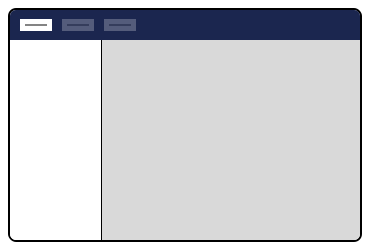
Section Sidebar extensions are optional; if not defined, the Section extension defaults to a single full-screen subview.
Section Sidebar
## Manifest Properties
The `sectionSidebarApp` manifest supports the following properties:
| Property | Type | Required | Description |
| ------------- | ------------------- | -------- | ------------------------------------------------------------------------------------------------------------------------------------------------------------------------------- |
| `type` | string | Yes | Must be `sectionSidebarApp`. |
| `alias` | string | Yes | A unique identifier for this extension. |
| `name` | string | Yes | A human-readable name shown in Extension Insights. |
| `weight` | number | No | Controls the display order when multiple sidebar apps are registered in the same section. Higher values display higher in the sidebar. |
| `kind` | string | No | Inherit a preset configuration, for example, `menu`. See [Extension Kinds](/umbraco-cms/extend-your-project/backoffice-extensions/extending-overview/extension-types/kind.md). |
| `element` | string | No | Path to a custom web component file. |
| `elementName` | string | No | The custom element tag name (if not a default export). |
| `meta` | object | No | Additional configuration depending on the `kind` used. |
| `conditions` | array | No | Conditions that must pass for the app to appear. See [Extension Conditions](/umbraco-cms/extend-your-project/backoffice-extensions/extending-overview/extension-conditions.md). |
| `overwrites` | string \| string\[] | No | Alias(es) of extensions this manifest replaces. |
For the full TypeScript interface, see [`ManifestSectionSidebarApp`](https://apidocs.umbraco.com/v18/ui-api/interfaces/packages_core_section.ManifestSectionSidebarApp.html) in the API documentation.
For a general overview of manifest properties shared across all extension types, see [Extension Manifest Introduction](/umbraco-cms/extend-your-project/backoffice-extensions/extending-overview/extension-registry/extension-manifest.md).
## Section Sidebar Apps
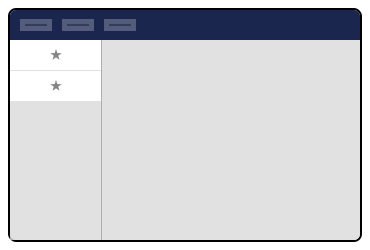
Section Sidebar extensions can be composed of **one or more** section sidebar apps. Extension authors can include common Umbraco types, such as menus and trees, or create custom sidebar apps using web components.
Section Sidebar Apps
### Custom Sidebar App Example
Section Sidebar extension authors can place any custom web component into the sidebar. Extension authors will need to supply the `element` property with the path of their custom web component. Specify the full path, starting from the Umbraco project root.
Sidebar Section extension authors may specify where the Section Sidebar app appears using [extension conditions](/umbraco-cms/extend-your-project/backoffice-extensions/extending-overview/extension-types/condition.md).
{% tabs %}
{% tab title="JSON" %}
{% code title="umbraco-package.json" %}
```json
{
"$schema": "../../umbraco-package-schema.json",
"name": "My Package",
"version": "1.0.0",
"extensions": [
{
"type": "sectionSidebarApp",
"alias": "My.SectionSidebarApp",
"name": "My Section Sidebar App",
"weight": 100,
"element": "/App_Plugins//sidebar-app.js",
"conditions": [{
"alias": "Umb.Condition.SectionAlias",
"match": "My.Section"
}]
}]
}
```
{% endcode %}
{% endtab %}
{% tab title="TypeScript" %}
These should be registered via a [Backoffice Entry Point](/umbraco-cms/extend-your-project/backoffice-extensions/extending-overview/extension-types/backoffice-entry-point.md).
{% code title="manifests.ts" %}
```ts
import type { ManifestSectionSidebarApp } from '@umbraco-cms/backoffice/section';
export const manifest: ManifestSectionSidebarApp = {
type: 'sectionSidebarApp',
alias: 'My.SectionSidebarApp',
name: 'My Section Sidebar App',
weight: 100,
element: () => import('./sidebar-app.element.js'),
conditions: [{
alias: 'Umb.Condition.SectionAlias',
match: 'My.Section'
}]
};
```
{% endcode %}
{% endtab %}
{% endtabs %}
{% hint style="info" %}
`Umb.Condition.SectionAlias` is a built-in condition type provided by Umbraco. You must use the exact alias string. Refer to the [Extension Conditions](/umbraco-cms/extend-your-project/backoffice-extensions/extending-overview/extension-conditions.md) documentation for the complete list of available conditions and their parameters.
{% endhint %}
### Menu Sidebar App Examples
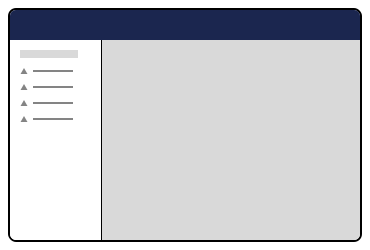
The menu sidebar app, provided by Umbraco, can be placed in Section Sidebar extensions. It attaches to a menu defined in your manifest via the `meta:menu` property, where this value must match the `alias` value of the menu.
Menu Sidebar App
{% tabs %}
{% tab title="JSON" %}
{% code title="umbraco-package.json" %}
```json
{
"$schema": "../../umbraco-package-schema.json",
"name": "My Package",
"version": "1.0.0",
"extensions": [
{
"type": "sectionSidebarApp",
"kind": "menu",
"alias": "My.SectionSidebarApp.MyMenu",
"name": "My Menu Section Sidebar App",
"weight": 200,
"meta": {
"label": "My Sidebar Menu",
"menu": "My.Menu"
},
"conditions": [{
"alias": "Umb.Condition.SectionAlias",
"match": "My.Section"
}]
}]
}
```
{% endcode %}
{% endtab %}
{% tab title="TypeScript" %}
These should be registered via a [Backoffice Entry Point](/umbraco-cms/extend-your-project/backoffice-extensions/extending-overview/extension-types/backoffice-entry-point.md).
{% code title="manifests.ts" %}
```ts
import type { ManifestSectionSidebarAppMenuKind } from '@umbraco-cms/backoffice/menu';
export const manifest: ManifestSectionSidebarAppMenuKind = {
type: 'sectionSidebarApp',
kind: 'menu',
alias: 'My.SectionSidebarApp.MyMenu',
name: 'My Menu Section Sidebar App',
weight: 200,
meta: {
label: 'My Sidebar Menu',
menu: 'My.Menu'
},
conditions: [{
alias: 'Umb.Condition.SectionAlias',
match: 'My.Section'
}]
};
```
{% endcode %}
{% endtab %}
{% endtabs %}
{% hint style="info" %}
Umbraco also provides a menuWithEntityActions kind, which extends the menu kind to automatically surface registered Entity Actions for items in the menu. Use this kind when your menu items represent entities that have actions (such as create, delete, or move).
{% endhint %}
In the example below, a menu extension is created and bound to the `meta:menu` (`My.Menu`) property, which matches the menu extension’s `alias`. The *My.Menu* alias is also used to attach a menu item extension.
{% code title="umbraco-package.json" %}
```json
[
{
"type": "menu",
"alias": "My.Menu",
"name": "Section Sidebar Menu"
},
{
"type": "menuItem",
"alias": "SectionSidebar.MenuItem1",
"name": "Menu Item 1",
"meta": {
"label": "Menu Item 1",
"menus": ["My.Menu"]
}
}
]
```
{% endcode %}
For more information, see the documentation for the [menus](/umbraco-cms/extend-your-project/backoffice-extensions/extending-overview/extension-types/menu.md) extension.
#### Coordinating subviews with menu items
Menu sidebar apps can coordinate navigation between subviews in the section extension by referencing [workspace extensions](/umbraco-cms/extend-your-project/backoffice-extensions/extending-overview/extension-types/workspaces.md). Modify the menu item extension to include the `meta:entityType` property, and assign it the same value as a workspace view extension's own `meta:entityType` property.
{% code title="umbraco-package.json" %}
```json
[
{
"type": "menuItem",
"alias": "SectionSidebar.MenuItem1",
"name": "Menu Item 1",
"meta": {
"label": "Menu Item 1",
"menus": ["My.Menu"],
"entityType": "myCustomWorkspaceView"
}
},
{
"type": "workspace",
"name": "Workspace 1",
"alias": "SectionSidebar.Workspace1",
"element": "/App_Plugins//my-custom-workspace.js",
"meta": {
"entityType": "myCustomWorkspaceView"
}
}
]
```
{% endcode %}
These should be registered via a Backoffice Entry Point.
{% code title="manifests.ts" %}
```ts
export const manifests: UmbExtensionManifest[] = [
{
type: 'menuItem',
alias: 'SectionSidebar.MenuItem1',
name: 'Menu Item 1',
meta: {
label: 'Menu Item 1',
menus: ['My.Menu'],
entityType: 'myCustomWorkspaceView'
}
},
{
type: 'workspace',
name: 'Workspace 1',
alias: 'SectionSidebar.Workspace1',
element: () => import('./my-custom-workspace.element.js'),
meta: {
entityType: 'myCustomWorkspaceView'
}
}
];
```
{% endcode %}
Menu items and workspaces are linked by matching `entityType` values.
#### Adding items to an existing menu
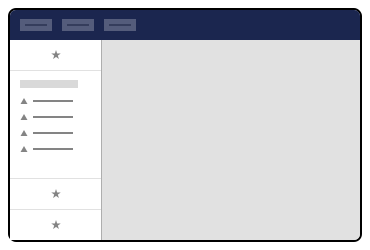
Authors can add their extensions to the sidebar of any Umbraco-provided section (Content, Media, Settings, etc.) by configuring `conditions` with the `SectionAlias` property.
Composed sidebar menu
{% tabs %}
{% tab title="JSON" %}
{% code title="umbraco-package.json" %}
```json
{
"$schema": "../../umbraco-package-schema.json",
"name": "My Package",
"version": "1.0.0",
"extensions": [
{
"type": "sectionSidebarApp",
"alias": "My.SectionSidebarApp",
"name": "My Section Sidebar App",
"element": "/App_Plugins//sidebar-app.js",
"conditions": [{
"alias": "Umb.Condition.SectionAlias",
"match": "Umb.Section.Settings"
}]
}]
}
```
{% endcode %}
{% endtab %}
{% tab title="TypeScript" %}
These should be registered via a Backoffice Entry Point.
{% code title="manifests.ts" %}
```ts
import type { ManifestSectionSidebarApp } from '@umbraco-cms/backoffice/section';
export const manifest: ManifestSectionSidebarApp = {
type: 'sectionSidebarApp',
alias: 'My.SectionSidebarApp',
name: 'My Section Sidebar App',
element: () => import('./sidebar-app.element.js'),
conditions: [
{
alias: 'Umb.Condition.SectionAlias',
match: 'Umb.Section.Settings'
}
]
};
```
{% endcode %}
{% endtab %}
{% endtabs %}
**Section Aliases**
Common Umbraco-provided section aliases:
* `Umb.Section.Content`
* `Umb.Section.Media`
* `Umb.Section.Settings`
* `Umb.Section.Packages`
* `Umb.Section.Users`
* `Umb.Section.Members`
* `Umb.Section.Translation`
---
# Agent Instructions
This documentation is published with GitBook. GitBook is the documentation platform designed so that both humans and AI agents can read, navigate, and reason over technical content effectively. Learn more at gitbook.com.
## Querying This Documentation
If you need additional information that is not directly available in this page, you can query the documentation by asking a question.
Perform an HTTP GET request on the following URL with the `ask` and `goal` query parameters:
```
GET https://docs.umbraco.com/umbraco-cms/extend-your-project/backoffice-extensions/extending-overview/extension-types/sections/section-sidebar.md?ask=&goal=
```
`ask` is the immediate question: it should be specific, self-contained, and written in natural language.
`goal` is what the user is ultimately trying to achieve, the reason they need the answer. Sharing it helps GitBook give you a better, more relevant answer. A goal is most helpful when it describes the outcome the user wants rather than restating the question. For example, with `ask=how do I create an API token`, a goal like `automate deployments from our CI pipeline` lets GitBook tailor the answer to that use case.
The response will contain a direct answer to the question and relevant excerpts and sources from the documentation.
Use this mechanism when the answer is not explicitly present in the current page, you need clarification or additional context, or you want to retrieve related documentation sections.