> For the complete documentation index, see [llms.txt](https://docs.umbraco.com/llms.txt). Markdown versions of documentation pages are available by appending `.md` to page URLs; this page is available as [Markdown](https://docs.umbraco.com/umbraco-engage/17.latest/security-and-privacy/gdpr/how-to-become-gdpr-compliant-using-cookiebot.md).
# How to become GDPR compliant using Cookiebot
This article explains how to implement CookieBot with Umbraco Engage to comply with GDPR.
Integrating a cookie consent banner service such as CookieBot allows you to configure parts of Umbraco Engage based on [user consent](https://docs.umbraco.com/umbraco-engage/17.latest/developers/introduction/the-umbraco-engage-cookie/module-permissions.md).
This article gives you a working implementation to use with [CookieBot](https://www.cookiebot.com/).
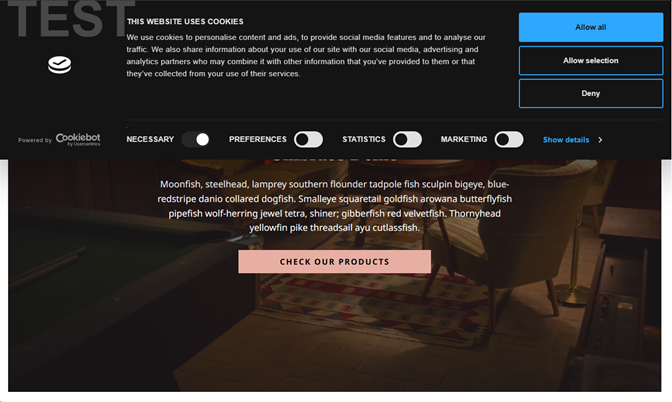
Cookiebot in Umbraco.
## Code Example
The code example below shows how to create the backend code to read the CookieBot consent cookie from the end user. Based on that, decide which features of Umbraco Engage it should enable or disable.
1. Create a class that implements the `Umbraco.Engage.Infrastructure.Permissions.ModulePermissions.IModulePermissions` interface.
2. Check the current HTTPContext Request Cookies for the CookieBot cookie, which is named **CookieConsent.**
From some of the [documentation from CookieBot](https://www.cookiebot.com/en/developer/), implement the same logic to check if the value of the cookie is -1 or another value. If it is set to -1, CookieBot is indicating to us that this is a user within a region that does not require consent.
The rest of the code is deserializing the JSON string stored inside the cookie from CookieBot. It maps to the relevant cookie permission used for turning Umbraco Engage features on or off.
**CookieBotModulePermissions.cs**
```cs
using System.Text.Json;
using System.Text.Json.Serialization;
using System.Text.RegularExpressions;
using System.Web;
using Umbraco.Engage.Infrastructure.Permissions.ModulePermissions;
namespace Umbraco.Engage.StarterKit.CookieBot
{
public class CookieBotModulePermissions : IModulePermissions
{
public bool AbTestingIsAllowed(HttpContext context)
{
// Need to check CookieBot consent cookie
// Did they consent to AB testing
return IsAllowed(context, "marketing");
}
public bool AnalyticsIsAllowed(HttpContext context)
{
// Need to check CookieBot consent cookie
// Did they consent to Analytics
return IsAllowed(context, "statistics");
}
public bool PersonalizationIsAllowed(HttpContext context)
{
// Need to check CookieBot consent cookie
// Did they consent to Personalization
return IsAllowed(context, "preferences");
}
public bool IsAllowed(HttpContext context, string cookiePermission)
{
// C# Code from CookieBot to check for their cookie
// https://www.cookiebot.com/en/developer/#h-server-side-usage
var rawCookieBotConsentValues = context.Request.Cookies["CookieConsent"];
if (rawCookieBotConsentValues != null)
{
switch (rawCookieBotConsentValues)
{
case "-1":
// The user is not within a region that requires consent - all cookies are accepted
// Then we can mark Umbraco Engage features as allowed
return true;
default:
// The user has given their consent
return CheckCookieBotValue(rawCookieBotConsentValues, cookiePermission);
}
}
//The user has not accepted cookies - set strictly necessary cookies only
return false;
}
public bool CheckCookieBotValue(string rawCookieBotConsentValues, string cookiePermissionToCheck)
{
// Read current user consent in encoded JSON
// Sample JSON cookie payload
/*
* {
* stamp:'Ov4gD1JVnDnBaJv8K2wYQlyWlnNlT/AKO768tibZYdQGNj/EolraLw==',
* necessary:true,
* preferences:false,
* statistics:true,
* marketing:false,
* method:'explicit',
* ver:1,
* utc:1698057791350,
* region:'gb'
* }
*/
// Decode the consent string
var rawDecodedConsent = HttpUtility.UrlDecode(rawCookieBotConsentValues);
if(rawDecodedConsent == null)
{
return false;
}
// Because the CookieBot consent cookie is not actually valid JSON, we need to do some preprocessing.
// Step 1: Quote property names (e.g., stamp → "stamp")
var consentStep1 = Regex.Replace(rawDecodedConsent, @"(?<={|,)\s*(\w+)\s*:", m => $"\"{m.Groups[1].Value}\":");
// Step 2: Replace single-quoted string values with double quotes
var consentStep2 = Regex.Replace(consentStep1, @"'([^']*)'", "\"$1\"");
// Deserialize the consent to a dynamic object
var cookieBotConsentValues = JsonSerializer.Deserialize(consentStep2);
if (cookieBotConsentValues == null)
{
// Something went wrong with the cookieConsent deserialization
return false;
}
switch (cookiePermissionToCheck)
{
case "necessary":
return cookieBotConsentValues.Necessary;
case "preferences":
return cookieBotConsentValues.Preferences;
case "statistics":
return cookieBotConsentValues.Statistics;
case "marketing":
return cookieBotConsentValues.Marketing;
default:
break;
}
return false;
}
}
public class CookieBotConsent
{
[JsonPropertyName("necessary")]
public bool Necessary { get; set; }
[JsonPropertyName("preferences")]
public bool Preferences { get; set; }
[JsonPropertyName("statistics")]
public bool Statistics { get; set; }
[JsonPropertyName("marketing")]
public bool Marketing { get; set; }
}
}
```
**CookieBotComposer.cs**
{% code overflow="wrap" lineNumbers="true" %}
```cs
using Umbraco.Cms.Core.Composing;
using Umbraco.Engage.Common.Composing;
using Umbraco.Engage.Infrastructure.Permissions.ModulePermissions;
namespace Umbraco.Engage.StarterKit.CookieBot
{
[ComposeAfter(typeof(UmbracoEngageApplicationComposer))]
public class CookieBotComposer : IComposer
{
public void Compose(IUmbracoBuilder builder)
{
builder.Services.AddUnique();
}
}
}
```
{% endcode %}
### CookieBot Cookie Keys
The existing CookieBot cookie Keys are mapped to the following Umbraco Engage features:
| **CookieBot Key** | **Umbraco Engage Features** |
| ----------------- | --------------------------- |
| Preferences | Personalization |
| Statistics | Analytics |
| Marketing | A/B Testing |
### Configuring CookieBot
For information on setting up and configuring your Cookie Consent Banner, see the [Cookiebot Documentation](https://www.cookiebot.com/en/developer/). It contains information on changing the wording and the look and feel of the cookie consent banner.
### Installing CookieBot
To install CookieBot, insert the JavaScript tag provided by CookieBot into the `` of your HTML template:
```html
```
### Tracking a Visitor's Initial Pageview
Umbraco Engage does not actively track visitors until they have given their consent to the Cookiebot configuration. After the visitor consents, the page must reload so that Umbraco Engage can issue the visitor cookie and register the pageview. A plain reload makes the browser send the site's own URL as the referrer, so the visitor's real traffic source is lost.
Call `umbracoEngage.analytics.consentGranted()` instead of reloading the page yourself. It stores the original referrer for the reload, then reloads the page. Umbraco Engage uses the stored referrer for the pageview that follows.
Handle the **CookiebotOnDialogDisplay** and **CookiebotOnAccept** events. Register the listeners before the Cookiebot script runs, so that neither event is missed:
```js
// The banner is only displayed to visitors who still have to choose, so this marks "consent is given on this page".
var consentRequestedOnThisPage = false;
window.addEventListener("CookiebotOnDialogDisplay", function () {
consentRequestedOnThisPage = true;
});
window.addEventListener("CookiebotOnAccept", function () {
// CookiebotOnAccept also fires on every page load for visitors who have already consented.
// Only continue when consent was given on this page, or the page reloads in a loop.
if (!consentRequestedOnThisPage || !Cookiebot.consent.statistics) {
return;
}
// The Umbraco Engage script may not be loaded yet (defer, async, or a script held back until consent).
if (window.umbracoEngage && umbracoEngage.analytics && umbracoEngage.analytics.consentGranted) {
umbracoEngage.analytics.consentGranted();
} else {
window.location.reload();
}
});
```
{% hint style="warning" %}
* Call `consentGranted()` only after the consent state that your `IModulePermissions` implementation reads has been saved. The reloaded request is evaluated against it. For Cookiebot, the **CookiebotOnAccept** event is raised after the visitor accepts.
* Call it only when consent changes from no to yes. Some consent platforms raise their accept event on every page load. Calling `consentGranted()` each time reloads the page in a loop.
* The function exists only once the Umbraco Engage analytics script has loaded. Calling it earlier throws an error and the page never reloads. The example above checks for the function and falls back to `window.location.reload()`. The fallback does not preserve the original referrer.
* Headless setups are not covered. The function only works with pages rendered by Umbraco, where the Umbraco Engage script handles the reload.
{% endhint %}
#### The `ue-consent-referrer` cookie
`consentGranted()` writes a short-lived first-party cookie named `ue-consent-referrer`, which holds the page's original referrer. It is written only when the visitor has consented, so visitors who decline get no cookie. It is removed by Umbraco Engage when the reloaded request is processed, and by the script on the next page load if it is still present. It expires after 20 seconds at most.
If the referrer is too long to store in a cookie, only its origin is kept. Umbraco Engage ignores a value that is not an absolute `http` or `https` URL.
To handle navigation yourself, call `consentGranted({ reload: false })`. It stores the referrer without reloading the page. Reload within 20 seconds, or the original referrer is lost.
For more details, see the [Cookiebot Documentation](https://www.cookiebot.com/en/developer/#h-event-handling).
---
# Agent Instructions
This documentation is published with GitBook. GitBook is the documentation platform designed so that both humans and AI agents can read, navigate, and reason over technical content effectively. Learn more at gitbook.com.
## Querying This Documentation
If you need additional information that is not directly available in this page, you can query the documentation by asking a question.
Perform an HTTP GET request on the following URL with the `ask` and `goal` query parameters:
```
GET https://docs.umbraco.com/umbraco-engage/17.latest/security-and-privacy/gdpr/how-to-become-gdpr-compliant-using-cookiebot.md?ask=&goal=
```
`ask` is the immediate question: it should be specific, self-contained, and written in natural language.
`goal` is what the user is ultimately trying to achieve, the reason they need the answer. Sharing it helps GitBook give you a better, more relevant answer. A goal is most helpful when it describes the outcome the user wants rather than restating the question. For example, with `ask=how do I create an API token`, a goal like `automate deployments from our CI pipeline` lets GitBook tailor the answer to that use case.
The response will contain a direct answer to the question and relevant excerpts and sources from the documentation.
Use this mechanism when the answer is not explicitly present in the current page, you need clarification or additional context, or you want to retrieve related documentation sections.