> For the complete documentation index, see [llms.txt](https://docs.umbraco.com/llms.txt). Markdown versions of documentation pages are available by appending `.md` to page URLs; this page is available as [Markdown](https://docs.umbraco.com/umbraco-cms/extend-your-project/backoffice-extensions/extending-overview/extension-types/entity-actions.md).
# Entity Actions
Entity Actions give developers the ability to add custom actions to a fly-out menu.
{% hint style="info" %}
**Entity Actions** was previously known as **Tree Actions.**
{% endhint %}
Entity Actions is an extension type that provides a fly-out context menu for secondary or additional functionality to an entity (document, media, etc...).
Developers can define and associate custom actions for entities in a [tree extension](/umbraco-cms/extend-your-project/backoffice-extensions/extending-overview/extension-types/tree.md), workspace, or collection view. Access to these actions can be controlled via user permissions. The Users section of the backoffice allows Administrators to control which actions a user has permissions to access.
## Display Modes
Entity Actions extensions can be displayed in a variety of formats.
### Sidebar Context Menu
The sidebar context mode provides a second-level context menu that flies out from the content tree. Backoffice users will typically find default items such as sorting, moving, deleting, and publishing workflow actions here.

### Workspace Entity Menu
The workspace entity mode provides a drop-down menu that flies out from the upper decking of a workspace.

### Collection Menu
The collection mode provides a drop-down menu that appears above a collection view.

### Picker Menu
The picker mode provides a menu in a sidebar modal.

## Registering an Entity Action
To register an entity action, developers declare the entity action in the manifest file, and then extend the `UmbEntityActionBase` class to program the action's behavior.
### Declare the Entity Action
{% code title="entity-action/manifest.ts" %}
```typescript
import { umbExtensionsRegistry } from '@umbraco-cms/backoffice/extension-registry';
const manifest = {
type: 'entityAction',
kind: 'default',
alias: 'My.EntityAction',
name: 'My Entity Action',
weight: 10,
api: () => import('./my-entity-action.js'),
forEntityTypes: ['my-entity'],
meta: {
icon: 'icon-add',
label: 'My Entity Action',
},
};
umbExtensionsRegistry.register(manifest);
```
{% endcode %}
## The Entity Action Class
Umbraco provides a few generic actions that can be used across silos, such as copy, move, trash, etc. Umbraco may include additional generic actions in the future.
Entity Action extensions will need to supply a class to the extension definition using the `api` property in the manifest file. This class will be instantiated as part of the action and will be passed a reference to the entity that invoked it.
The entity action class will provide one of the following methods:
* `getHref` - returns a URL that will be used for navigation
* `execute` - programs custom imperative behaviors that can work with contexts and service APIs
If both methods are provided in the entity action class, the `getHref` method will be preferred.
When the action is completed, an event on the host element will be dispatched to notify any surrounding elements.
### The `getHref()` Method
Entity action extensions are provided by the `this.args` property, via the `UmbEntityActionBase` superclass. The `this.args` contains a property, `unique` that allows developers to identity which element the user selected.
The `getHref()` method must return a string value, and the result will be rendered into the DOM as an anchor/link.
{% code title="entity-action/my-entity-action.ts" %}
```typescript
import { UmbEntityActionBase } from '@umbraco-cms/backoffice/entity-action';
export class MyEntityAction extends UmbEntityActionBase {
override async getHref() {
return `my-link/path-to-something/${this.args.unique}`;
}
}
export { MyEntityAction as api };
```
{% endcode %}
### The `execute()` Method
The `execute()` method is flexible and allows developers to perform nearly any task on an entity. Developers can perform network requests with the [Umbraco HTTP Client](/umbraco-cms/extend-your-project/backoffice-extensions/foundation/fetching-data/http-client.md), or access a repository. The following example gets an item from the API in the [Creating a backoffice API](/umbraco-cms/extend-your-project/tutorials/creating-a-backoffice-api.md) tutorial.
{% hint style="info" %}
The [Executing Requests](/umbraco-cms/extend-your-project/backoffice-extensions/foundation/fetching-data.md) article provides an overview of the methods for fetching data from Umbraco, including `tryExecute()` requests.
{% endhint %}
{% code title="entity-action/my-fetch-entity-action.ts" %}
```typescript
import { UmbEntityActionBase } from '@umbraco-cms/backoffice/entity-action';
import { umbHttpClient } from '@umbraco-cms/backoffice/http-client';
import { tryExecute } from '@umbraco-cms/backoffice/resources';
export class MyFetchEntityAction extends UmbEntityActionBase {
override async execute() {
const { data, error } = await tryExecute(
this,
umbHttpClient.get({
url: `/umbraco/management/api/v1/my/item/${this.args.unique}`,
security: [{ scheme: 'bearer', type: 'http' }],
}),
);
if (error) {
throw error;
}
if (data) {
console.log(data); // Do something with the data
}
}
}
export { MyFetchEntityAction as api };
```
{% endcode %}
### Overriding the `UmbEntityActionBase` Constructor
If additional contexts are needed, they can be consumed from the host element via the `constructor` method.
{% code title="entity-action/my-custom-modal-entity-action.ts" %}
```typescript
import { MY_CUSTOM_MODAL_TOKEN } from './my-custom-modal-token.js';
import { UmbEntityActionBase } from '@umbraco-cms/backoffice/entity-action';
import { UMB_MODAL_MANAGER_CONTEXT } from '@umbraco-cms/backoffice/modal';
import type { UmbControllerHostElement } from '@umbraco-cms/backoffice/controller-api';
import type { UmbEntityActionArgs } from '@umbraco-cms/backoffice/entity-action';
export class MyCustomModalEntityAction extends UmbEntityActionBase {
#modalManager?: typeof UMB_MODAL_MANAGER_CONTEXT.TYPE;
constructor(host: UmbControllerHostElement, args: UmbEntityActionArgs) {
super(host, args);
this.consumeContext(UMB_MODAL_MANAGER_CONTEXT, (modalContext) => {
this.#modalManager = modalContext;
});
}
override async execute() {
const modal = this.#modalManager?.open(this, MY_CUSTOM_MODAL_TOKEN, {});
if (!modal) {
console.error('No modal manager found!');
return;
}
await modal.onSubmit();
console.log(modal.value); // Do something with the submitted data.
}
}
export { MyCustomModalEntityAction as api };
```
{% endcode %}
## User Permission Codes
Developers can define custom user permission codes to control access to their actions, in addition to the standard Umbraco user permission codes. Custom permission codes need to be unique and should not clash with existing permission codes.
Each permission has a set of verbs that will be checked against on both the client and server.
### Standard Umbraco Permission Letters
| Legacy backoffice letter | Verb |
| ------------------------ | -------------------------------- |
| C | Umb.Document.Create |
| F | Umb.Document.Read |
| A | Umb.Document.Update |
| D | Umb.Document.Delete |
| I | Umb.Document.CreateBlueprint |
| N | Umb.Document.Notifications |
| U | Umb.Document.Publish |
| R | Umb.Document.Permissions |
| Z | Umb.Document.Unpublish |
| O | Umb.Document.Duplicate |
| M | Umb.Document.Move |
| S | Umb.Document.Sort |
| I | Umb.Document.CultureAndHostnames |
| P | Umb.Document.PublicAccess |
| K | Umb.Document.Rollback |
### Custom Permission Letters
Developers who create packages with custom entity actions are encouraged to update this document by submitting pull requests to the [documentation repository](https://github.com/umbraco/UmbracoDocs). This will inform other developers which permission letters they should avoid defining.
| Custom Backoffice letter | Verb |
| ------------------------ | ------------- |
| ⌘ | *Placeholder* |
## Entity Action Permissions
Umbraco provides two extension types for user permissions: **entity user permissions** and **granular user permissions.**
These two extension types are used in tandem with each other.
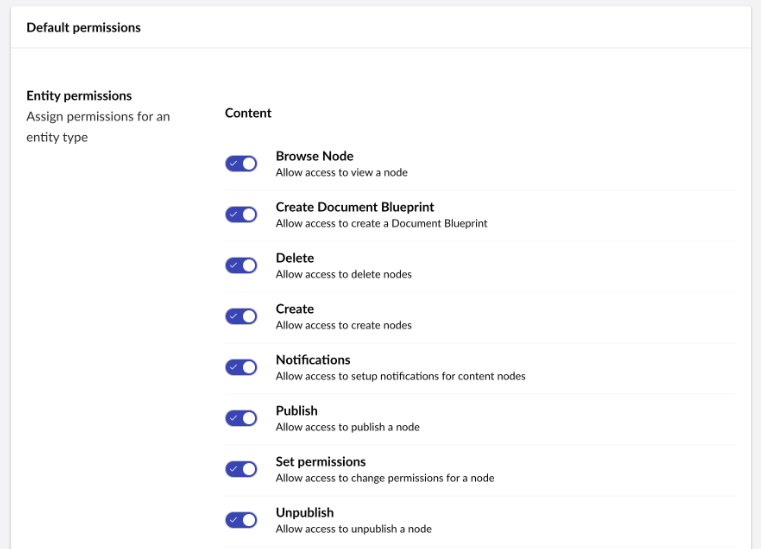
* `entityUserPermission`: Defines *what* can be done and allows assigning them globally to a User Group.
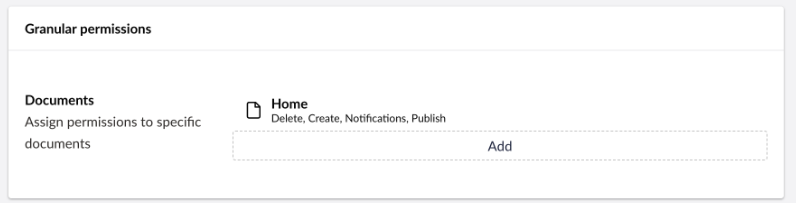
* `userGranularPermission`: Defines *how* those same verbs can be assigned to specific nodes in the User Management UI. These extension types provide an interactive interface in the backoffice to control permission assignment.
### Entity User Permissions
Entity user permissions are assigned to a document, media, member, etc., and are registered using the `entityUserPermission` type in the extension's manifest.
{% code title="entity-user-permission/manifest.ts" %}
```typescript
import { umbExtensionsRegistry } from '@umbraco-cms/backoffice/extension-registry';
const manifest = {
type: 'entityUserPermission',
alias: 'My.UserPermission.Document.Archive',
name: 'My Document Archive User Permission',
forEntityTypes: ['document'],
meta: {
verbs: ["My.Document.Archive"],
label: "Archive Document",
description: "Allow user to archive documents",
group: "administration"
},
};
umbExtensionsRegistry.register(manifest);
```
{% endcode %}
#### Management Interface
The `entityUserPermission` extension type will render a toggle control in the **Default permissions** pane in the Users > User Groups editor.
Entity User Permissions UI
### Granular User Permission
Default Granular User Permission UI
#### Management Interface
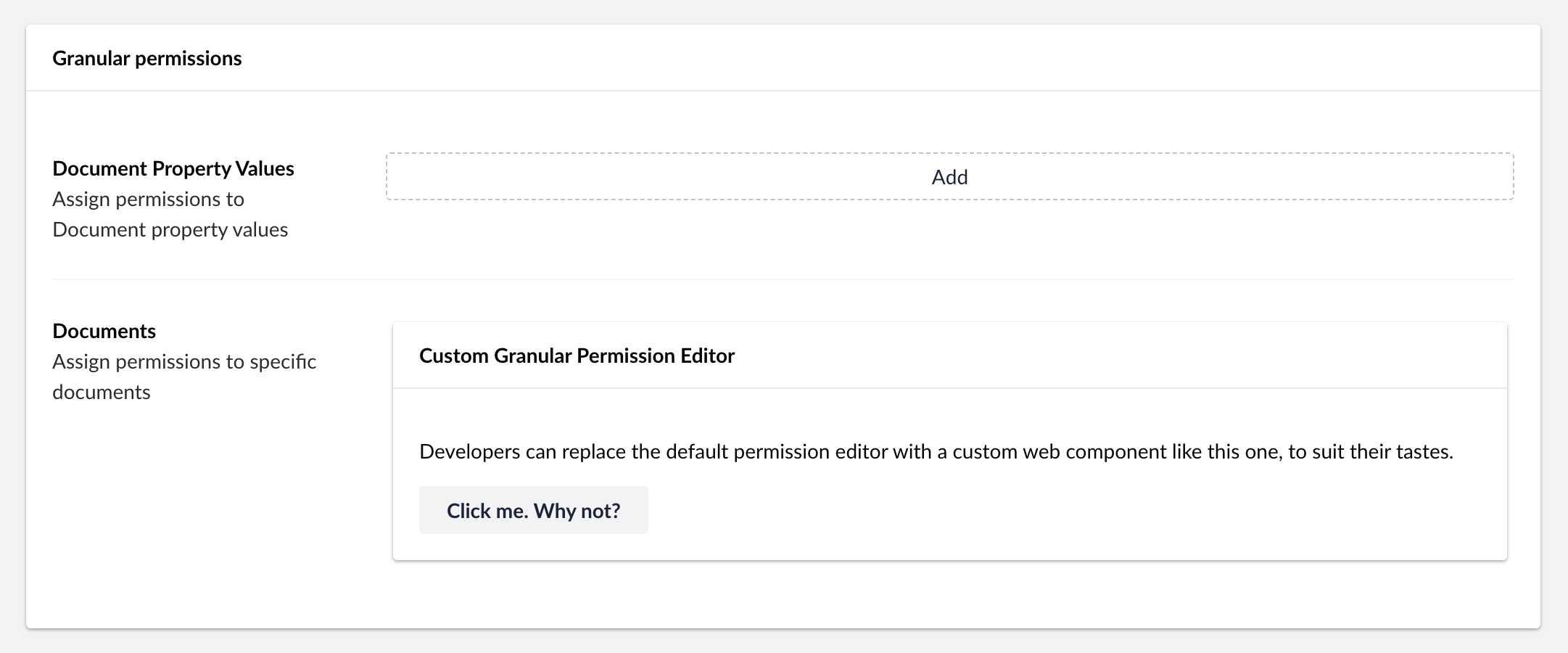
Extension developers can customize the selection and interaction style of a granular permission using the `element` property. The `element` property accepts the file location of a custom web component, and will render that component in the management interface.
The `userGranularPermission` extension type will render a document selection control in the **Granular permissions** pane in the Users > User Groups editor by default. The default selector can be replaced with a custom web component.
{% code title="user-granular-permission/manifest.ts" %}
```typescript
import { umbExtensionsRegistry } from '@umbraco-cms/backoffice/extension-registry';
const manifest = {
type: 'userGranularPermission',
alias: 'My.UserGranularPermission.Document',
name: 'My Document Granular User Permission',
element: () => import('./my-document-user-granular-permission-ui.js'),
meta: {
schemaType: "DocumentPermissionPresentationModel",
label: "Documents",
description: "Assign permissions to specific documents"
},
};
umbExtensionsRegistry.register(manifest);
```
{% endcode %}
Custom Granular User Permission UI
### Enforcing Permissions
Developers can enforce permission controls on **Entity Action** extensions by defining conditions in the `conditions` array.
In the following example, the `conditions:alias` property of an `entityAction` extension is `Umb.Condition.UserPermission.Document`. This condition checks the permissions of the current user for the document.
Similarly, the `conditions:allOf` array must contain the one of the values from the `meta:verbs` array of the `entityUserPermission` extension definition.
{% code title="entity-action/manifest.ts" %}
```typescript
import { umbExtensionsRegistry } from '@umbraco-cms/backoffice/extension-registry';
const manifest = {
type: 'entityAction',
kind: 'default',
alias: 'My.EntityAction.DocumentArchive',
name: 'My Document Archive Action',
api: () => import('./my-document-archive-entity-action.js'),
forEntityTypes: ['document'],
meta: {
icon: 'icon-box',
label: 'Archive',
},
conditions: [
{
alias: 'Umb.Condition.UserPermission.Document',
allOf: ['My.Document.Archive'],
},
],
};
umbExtensionsRegistry.register(manifest);
```
{% endcode %}
---
# Agent Instructions
This documentation is published with GitBook. GitBook is the documentation platform designed so that both humans and AI agents can read, navigate, and reason over technical content effectively. Learn more at gitbook.com.
## Querying This Documentation
If you need additional information that is not directly available in this page, you can query the documentation by asking a question.
Perform an HTTP GET request on the following URL with the `ask` and `goal` query parameters:
```
GET https://docs.umbraco.com/umbraco-cms/extend-your-project/backoffice-extensions/extending-overview/extension-types/entity-actions.md?ask=&goal=
```
`ask` is the immediate question: it should be specific, self-contained, and written in natural language.
`goal` is what the user is ultimately trying to achieve, the reason they need the answer. Sharing it helps GitBook give you a better, more relevant answer. A goal is most helpful when it describes the outcome the user wants rather than restating the question. For example, with `ask=how do I create an API token`, a goal like `automate deployments from our CI pipeline` lets GitBook tailor the answer to that use case.
The response will contain a direct answer to the question and relevant excerpts and sources from the documentation.
Use this mechanism when the answer is not explicitly present in the current page, you need clarification or additional context, or you want to retrieve related documentation sections.